
You open a fresh chat to continue a client job, and one of two things happens. ChatGPT asks you to paste the brief again, even though you were sure it already “knew” it. Or it answers smoothly and slips in a detail from a completely different conversation. Both problems come from the same decision made too casually: where the context was stored. That is what the ChatGPT Projects vs Memory vs Temporary Chat choice really is. It is not about which feature is better, but about how long a piece of context should live and who should be able to see it.
This guide works through that decision with one small test I ran across the three contexts, then covers the part most comparisons skip: how context drifts after you have picked the right home, and the habits that keep it visible.
Start with one question: how long should this context live?
Most confusion disappears once you sort information by lifespan instead of by feature. A one-off question, such as rewriting a placeholder notice in plainer English, needs no history at all. That belongs in a Temporary Chat, which does not appear in your chat history and does not create memories. A durable working preference, like “label unresolved items clearly,” is something you want in almost every conversation, which is exactly what Memory is for. An assignment with its own brief, files, revision rounds, and rules belongs in a Project, because that material should travel together and stay away from unrelated work.
There is a fourth category that none of the three handles: the exact approved facts and the final decision. A closure date, a price, or a sign-off lives in the verified source and with the person who approved it. A Project can organize that source and Memory can personalize the answer, but neither one proves the date is right.
| Context lifespan | Best home | What to watch |
|---|---|---|
| One isolated question | Temporary Chat | Saving it turns it back into a regular chat |
| Durable working preference | Memory | Changing task facts stored as if they were preferences |
| One assignment’s working set | Project | Old briefs and files left next to the current ones |
| Exact approved fact or decision | Verified source and a named approver | Treating generated or remembered text as approval |
One packet, three places to open it
To see where the boundaries actually sit, I stored a sanitized, fictional clinic work packet in a Project set to project-only memory. The packet held an approved message, a CTA, the desktop asset status, and the editorial owner. It also deliberately left several items open: the closure date, the mobile crop, special hours, the customer-message date, and the Google Business Profile hours. No real client, patient, or account information was involved.
I then opened a new chat inside the same Project and asked for a publication-readiness brief without pasting the packet again. The new chat recovered the approved copy, the CTA, the asset status, and the owner, and it kept every open item marked as unconfirmed instead of filling it in.
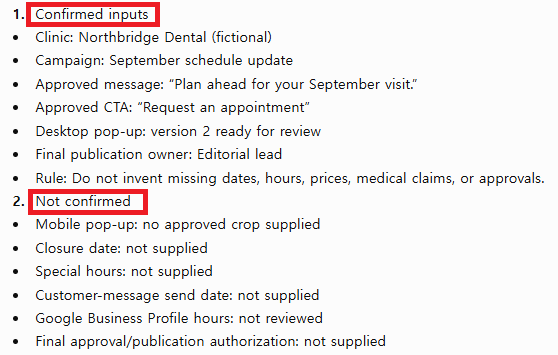
Next I asked for the same packet from outside the Project, once in a regular chat and once in a Temporary Chat. Neither one could see it, and neither one invented replacement details.
| Where I asked | What came back | What it means for the workflow |
|---|---|---|
| New chat in the same Project | Packet recovered, open items kept open | Use the Project for assignment continuity |
| Regular chat | Packet unavailable | Do not expect Memory to stand in for a task brief |
| Temporary Chat | Packet unavailable, no guessing | Use it for isolated one-off work |
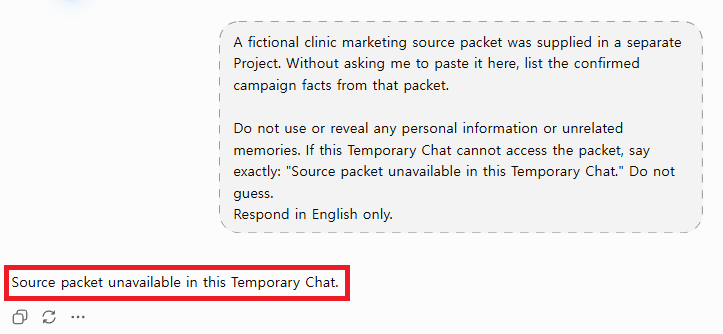
Field note: The most useful part of this result was not the recall. It was that continuity did not erase uncertainty. The Project carried the assignment, but the missing closure date stayed missing. When you review output from a Project chat, check that open items are still open before you check anything else, because a confident answer that quietly filled a blank looks identical to a correct one.
This was one run on one account, so it shows where a project-only boundary held, not how every account behaves. If you want to test how saved memories themselves show up in new chats, the Memory vs Temporary Chat recall test covers that side, and the Temporary Chat clean-room test compares the same prompt with and without saved context.
Context drift: what goes wrong after you pick the right home
Choosing the right container is only the first half. Recurring work tends to go wrong later, when context that was correct last week keeps influencing this week’s drafts. It usually enters from three directions. Memory carry-over happens when something saved as a memory, or a past chat the model can reference, fills a gap you meant to leave open. Thread dilution happens when one long conversation holds the old brief, the new brief, and several rounds of revisions, and the answers start blending them. Stale sources happen when last month’s file still sits in the Project next to this month’s.
Each of these has a simple counter. Replace the brief instead of stacking a new one on top, and put the month or version in the file name so a leftover is obvious. Start a new chat inside the Project for each cycle instead of correcting the same thread again and again, since rejected wording in a long thread can keep shaping new drafts. Before asking for any copy, have ChatGPT list every fact it plans to use and mark each one as confirmed or not, then compare that short list with the source. And keep facts out of Memory entirely. A closure reason saved there once is a closure reason waiting to resurface months later.
Field note: Drift rarely shows up in the date, because dates are easy to compare and most reviewers compare them. It tends to hide in the soft sentences: the reason for a closure, a phrase describing an event, a line that sounds like an offer. Read those lines against the source first. They are where an inherited detail looks most natural.
Project instructions that make drift visible
The instructions I used in the Project for the test were written to make missing information obvious rather than to make the writing better. They are short on purpose:
Use only the sources in this Project for dates, services,
and factual claims.

If required information is missing:
1. keep the placeholder;
2. label the missing input;
3. do not infer a substitute.

Separate approved copy from suggestions.

End each response with:
Confirmed / Needs approval / Missing input
The closing line does most of the work. When every answer has to end by sorting its own content into those three buckets, an invented detail has to be placed somewhere visible. These instructions organize the work, but they do not check whether a source file is correct. That job stays with the person who owns the source. For setup steps and file handling, see the ChatGPT Projects handoff workflow.
What none of the three options does for you
It is tempting to read these features as privacy settings, and that is where people get caught out. OpenAI states that Temporary Chats do not appear in chat history and do not create memories, but they are still retained for 30 days for safety purposes before deletion. Memory is optional and can be reviewed, edited, deleted, or turned off entirely, yet deleting a chat and deleting a saved memory are separate actions. The Data Controls guide walks through those layers in more detail.
A more private conversation is also not a more accurate one. None of the three options should be treated as a safe place for passwords, confidential client data, or anything you cannot afford to disclose, and none of them can approve a publication. That still needs a person and a record of who signed off.
Field note: My test only covers a Project set to project-only memory. I would not assume the same boundary for a Project left on a different memory setting, so open the Project’s settings and confirm which option it shows before you rely on the separation. The menu labels have shifted over time, which makes checking your own screen more reliable than any screenshot, including mine.
Putting the choice into practice
If you only remember one rule, make it this: store context according to how long it should live. Put the assignment in a Project, keep Memory for broad and non-sensitive preferences, use Temporary Chat for a separate question you do not need to keep, and leave exact facts and approvals in the verified source. Then, once the work is underway, watch for drift in the soft sentences and start a fresh Project chat each cycle.
If you want to go deeper on any single piece, the ChatGPT Memory guide shows how to check what was saved and retest after deleting it. Pick the smallest amount of persistent context that gets the job done, and verify anything important against the source before it leaves your hands.