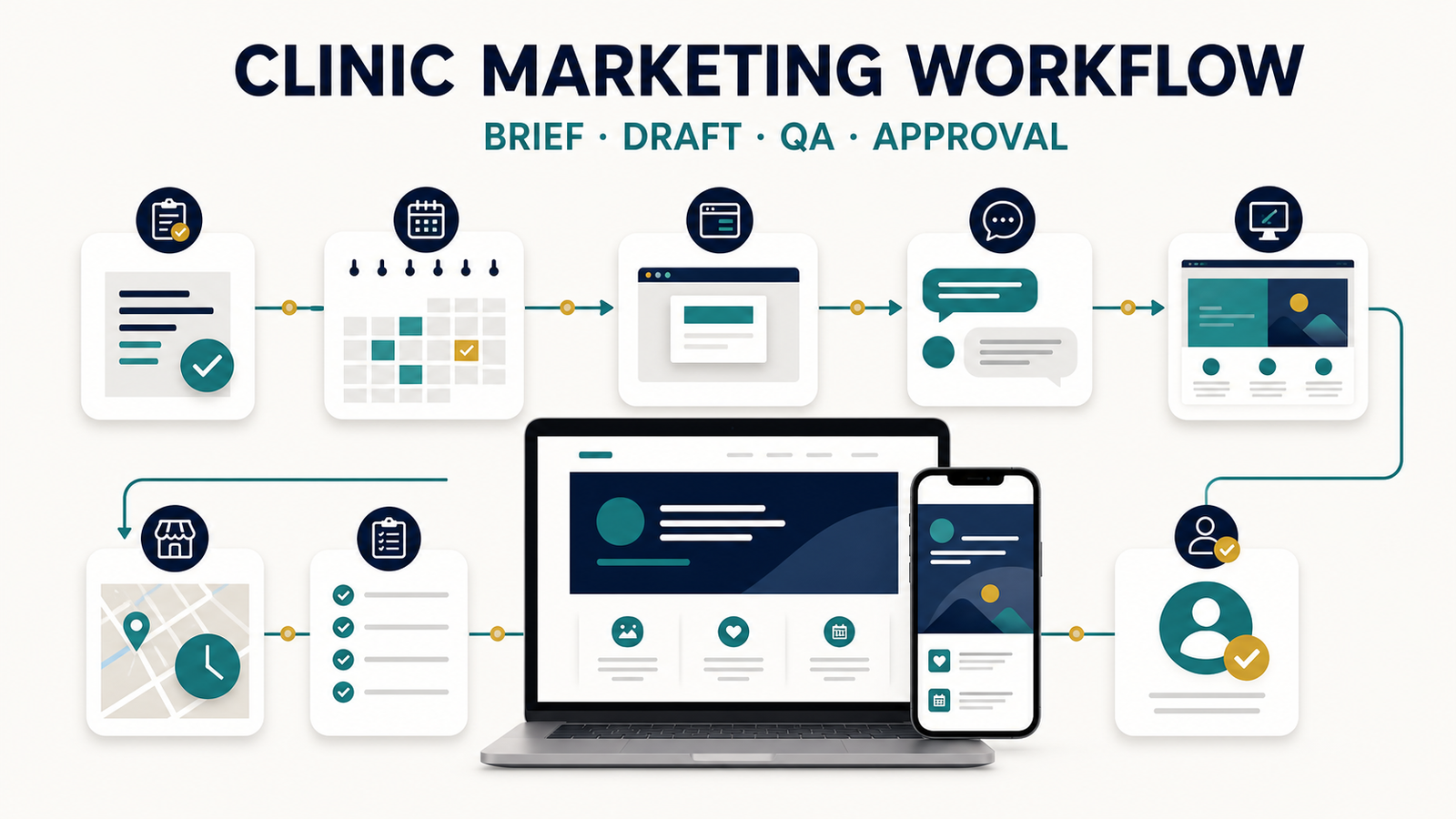
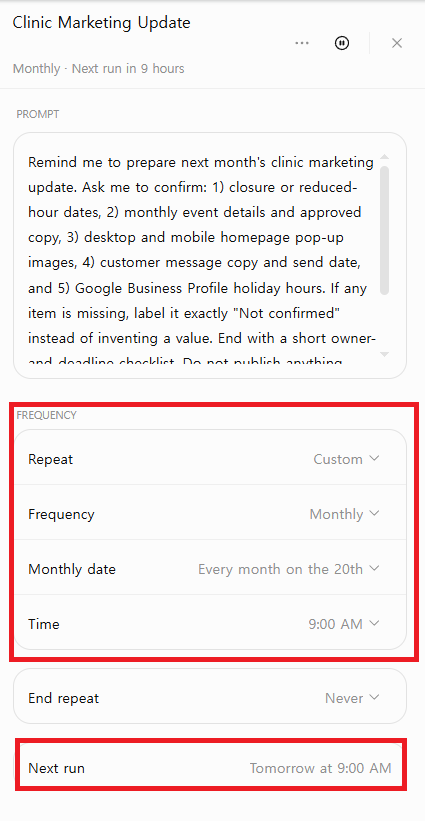
Editorial note: This walkthrough uses a fictional clinic scenario. Clinic names, schedules, and patient references are examples, not records from an actual clinic account. The task-setup screenshot shows a Scheduled Tasks configuration; the QA-result screen shows how the fictional scenario was handled. Neither image alone proves that the task ran automatically at a particular time.
In my recurring clinic-marketing work, one schedule change can affect a homepage pop-up, customer message, desktop and mobile creative, and Google Business Profile hours. I built this monthly QA walkthrough to find out whether ChatGPT could organize those channels without inventing missing dates, assets, approvals, or public copy.
This walkthrough uses a fictional clinic packet because no patient, employee, account, or confidential client information should be used for this kind of evaluation. The controlled example separated confirmed inputs from “Not confirmed” items, kept desktop and mobile QA distinct, and left publishing and account changes to a human reviewer.
The practical result was useful: ChatGPT turned a recurring handoff into an auditable checklist, but it still required human verification of every date, link, crop, claim, send time, and public listing. This article documents the monthly workflow, the scheduled checkpoint, the QA-result example, the failure modes, and the approval gate a team would keep in production.
Quick answer
Use one verified source brief, label every missing item as “Not confirmed,” and keep every public action behind a human approval gate. In this workflow, that structure prevents schedule changes, mobile assets, customer messages, and Google Business Profile hours from drifting apart.
In my recurring clinic-marketing work, the workflow pattern and evaluation criteria come from ongoing responsibilities. All clinic names, campaign details, schedules, and screenshots use fictional or sanitized information.
Problem Breakdown & Direct Resolution
The direct fix is to use one verified source brief, label every missing value “Not confirmed,” and keep publication behind a human approval gate. In this walkthrough, the structure keeps the homepage pop-up, customer message, desktop and mobile creative, and Google Business Profile hours aligned without allowing ChatGPT to invent operational facts.
- A date is missed: the popup is updated, but the customer message or business profile still shows regular hours.
- A revision is seen late: one channel uses the approved wording while another uses an earlier draft.
- Mobile creative is forgotten: a desktop layout is reduced until the date or callout becomes difficult to read.
- AI fills a blank: a vague request causes a model to invent a reason, reuse earlier context, or add generic promotional language.
- The design looks polished but is wrong: good visual quality can hide an incorrect date, broken text, or an unapproved claim.
The solution is not a longer prompt by itself. It is a workflow that separates verified facts, drafting, visual production, review, approval, and post-publication checking.
Step-by-Step Actionable Troubleshooting
Step 1: Run a source-of-truth checkpoint on the 20th
The recurring checkpoint should happen early enough to collect revisions without rushing the final creative. In the editor’s working routine, the useful reminder is:
On the 20th at 9:00 AM, confirm next month’s closure dates, event details, approved copy, and desktop/mobile image requirements.
A reminder can start the review, but it cannot approve facts. If you use ChatGPT reminders or scheduled tasks, treat them as a checkpoint trigger rather than an autonomous publishing system. See the separate guide to using ChatGPT Scheduled Tasks.
The Scheduled Tasks documentation describes the feature. As an editorial safeguard, test the prompt manually before scheduling it and review the first outputs. In this walkthrough, the scheduled checkpoint is treated as a review trigger, not an authorization to publish, send messages, or change business hours.
Step 2: Confirm what is public, approved, and still unknown
Create one brief with three clear statuses: confirmed, awaiting approval, and do not publish. ChatGPT should receive only the confirmed public facts it needs. If the reason for a closure or the final event offer is not approved, mark it as unknown instead of asking the model to make the draft sound complete.
| Field | Status | Action |
|---|---|---|
| Closure date and hours | Confirmed | Use consistently in every relevant channel |
| Public reason for closure | Awaiting approval | Use a neutral placeholder; do not invent |
| Monthly event title | Confirmed | Use exact approved wording |
| Offer terms | Draft | Do not publish or imply a benefit |
| Patient or appointment data | Private | Do not enter it into the marketing prompt |
Step 3: Build a channel matrix before writing
The same fact should not become identical copy everywhere. Each channel has a different job and a different review risk.
| Channel | Purpose | Required review |
|---|---|---|
| Homepage popup | Immediate schedule awareness | Date, time, hierarchy, close button, desktop/mobile crop |
| Customer message | Direct notice with concise context | Audience, send date, link, length, approved wording |
| Google Business Profile | Accurate public hours on Search and Maps | Special-hours date, closed/open state, saved public result |
| Desktop creative | Premium visual communication | Legibility, balance, artifacts, brand fit |
| Mobile creative | Readable small-screen notice | Separate composition, text size, safe crop, tap-area conflicts |
Google’s official Business Profile documentation recommends using special hours for temporary schedule changes so the regular business hours remain intact. The saved public profile still needs a human check.
Step 4: Give ChatGPT a controlled brief
A vague request such as “make next month’s clinic notice” leaves too many decisions open. The model may add a reason, reuse earlier details, or create polished copy that is not approved. A controlled prompt explicitly limits the source material and identifies what the model must not infer.
Copy-and-edit source brief
ORGANIZATION: [Fictional Clinic Name]
REVIEW MONTH: [Month and Year]
TIME ZONE: [Local time zone]

CONFIRMED SCHEDULE CHANGES:
- Date:
- Open or closed:
- Hours:
- Approved public reason:

CONFIRMED EVENT:
- Title:
- Dates:
- Approved terms:
- Approved URL:

REQUIRED OUTPUTS:
- Homepage popup copy
- Customer message
- Google Business Profile update note
- Desktop creative brief
- Mobile creative brief

DO NOT USE:
- Patient names, appointments, medical records, or private contact data
- Unapproved offers, claims, prices, dates, or reasons

UNKNOWN OR AWAITING APPROVAL:
- [List every missing item explicitly]
For a broader prompting framework, read How to Use ChatGPT for Work. The important difference here is that the clinic brief has a public-information boundary and a mandatory approval step.
Step 5: Generate channel drafts without inventing facts
You are preparing draft clinic marketing materials from the
verified source brief below.

Use only facts marked CONFIRMED.
Do not infer missing dates, reasons, prices, services, or benefits.
If a required detail is missing, write [APPROVAL NEEDED] in its place.

Create five separate outputs:
1. Homepage popup: headline, one-sentence notice, optional CTA.
2. Customer message: concise subject and body.
3. Google Business Profile: exact special-hours action for human entry.
4. Desktop creative brief: hierarchy, copy zones, and visual direction.
5. Mobile creative brief: a separate small-screen composition.

Keep dates unambiguous by spelling out the month.
After the drafts, list every fact that requires human verification.

SOURCE BRIEF:
[PASTE THE APPROVED BRIEF HERE]
This prompt does not guarantee accuracy. It makes missing information visible and creates separate drafts that are easier to review. The human editor remains responsible for the source brief, local compliance, final wording, design, and publication.
Step 6: Review desktop and mobile creative separately
In real design work, an attractive generated image is not automatically a usable clinic notice. Earlier vague image requests produced arbitrary content, text errors, shiny or broken-looking artifacts, and layouts that still required Photoshop correction. A stronger prompt can improve the starting point, but visual judgment remains essential.
The editor uses four practical questions:
- Can the composition be used for a homepage popup? A premium background is not enough if the central panel blocks the design or leaves no usable text hierarchy.
- Do background, panel, and message feel like one design? The content and background must work together rather than looking like separate assets placed on top of each other.
- Would Photoshop correction be efficient? Minor text or artifact correction may be reasonable. A structurally poor layout should be regenerated, not rescued through extensive retouching.
- Is the mobile version truly redesigned? A desktop popup scaled down is not a mobile design. The key date and action must remain readable at the actual display size.
Stop rule: If the hierarchy, text area, or mobile composition is fundamentally wrong, return to the brief. Do not spend time polishing an unusable foundation merely because the image appears finished.
Step 7: Use a human approval gate and verify the result
Note: The screenshots in this article show a ChatGPT Scheduled Tasks setup screen and a separate QA-result example. A setup screenshot alone does not confirm that a later output was delivered automatically at the scheduled time. Treat the scheduled checkpoint as a review trigger and confirm delivery behavior in your own account.
Every output should remain a draft until one reviewer checks the source and another final check confirms the public result. For a small team, the same person may perform both checks at different moments, but the steps should still be separate.
- Compare every date and time with the approved source.
- Confirm the public reason, event terms, and destination URL.
- Check desktop and mobile images at their real display sizes.
- Proofread text outside the image and any text embedded in the image.
- Publish the homepage popup and test its close behavior.
- Schedule or send the customer message only after audience and timing are confirmed.
- Save the Google Business Profile special hours, then view the public listing.
- Record who approved the final version and when.
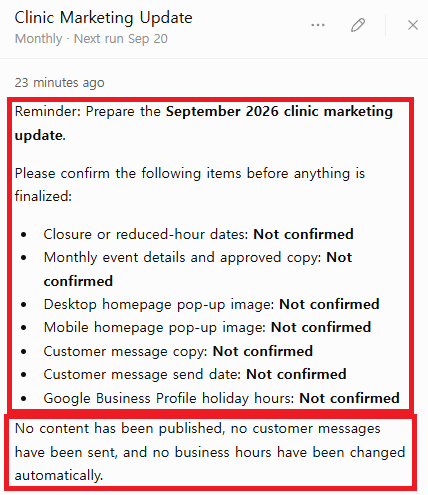
This QA-result example keeps closure dates, mobile creative, message timing, and business hours marked "Not confirmed" instead of inventing values.Real-World Pitfalls & Pro Tips
- Treat every missing date, hour, price, link, asset, or approval as “Not confirmed”; never let a polished draft turn an assumption into a public fact.
- Review desktop and mobile creative as separate deliverables. A desktop image that looks correct can still crop text, buttons, or the main subject on mobile.
- Keep publishing, customer messaging, and Google Business Profile changes behind a human approval gate. ChatGPT should organize the handoff, not make the final release decision.
A Realistic Test: Vague Request vs. Controlled Workflow
To test the method, compare two starting requests.
Test A: Vague request
“Create next month’s schedule in the style I want.”
A model can produce a calendar, priorities, event sections, or decorative elements, but it does not know the clinic’s approved dates, brand direction, popup dimensions, or real communication goal. The result may look organized while being unusable for the actual job.
Test B: Controlled workflow
The controlled version supplies the confirmed date, the exact notice purpose, required desktop and mobile formats, brand tone, forbidden data, and approval placeholders. The result is closer to production because the model is solving a defined communication problem instead of guessing the assignment.
| Evaluation | Vague request | Controlled workflow |
|---|---|---|
| Fact accuracy | Unknown facts may be invented | Confirmed fields and approval gaps are visible |
| Channel fit | One generic output | Separate popup, message, profile, desktop, and mobile drafts |
| Design usability | May look polished but miss the real format | Hierarchy and format requirements are defined |
| Review effort | Reviewer must discover assumptions | Verification list is produced with the drafts |
| Privacy | No boundary stated | Private patient and appointment data are excluded |
The useful lesson is not that a controlled prompt creates a perfect asset. It creates a more reviewable starting point and reduces hidden assumptions.
Privacy Boundaries for Clinic Marketing Prompts
Clinic marketing work may sit near sensitive operational information. That does not make all material suitable for an AI prompt. The safest approach is data minimization: include only what is needed to draft the public communication.
| Material | Recommended treatment |
|---|---|
| Approved public hours and closure dates | Use only after verifying the source |
| Approved public event title and URL | Use the exact approved version |
| Internal draft offer or pricing | Do not treat as publishable; mark approval status |
| Screenshot with names, emails, or appointment details | Redact or replace with fictional placeholders before use |
| Patient records, symptoms, appointments, or private contact data | Do not enter into the marketing prompt |
| Private client brand files | Follow the organization’s policy and permission requirements |
Before uploading any file or screenshot, use the five-question gate in the ChatGPT Data Controls guide. If the draft can be created with fictional or redacted material, use that safer substitute.
Specification / Comparison Checklist
MONTHLY CHECKPOINT — [DATE / TIME]

SOURCE
[ ] Next month's closure dates confirmed
[ ] Hours and time zone confirmed
[ ] Event title, terms, dates, and URL approved
[ ] Unknown items labeled APPROVAL NEEDED
[ ] Patient and private client data excluded

CHANNELS
[ ] Homepage popup copy drafted
[ ] Customer message drafted
[ ] Google Business Profile special-hours action listed
[ ] Desktop creative brief prepared
[ ] Mobile creative brief prepared separately

DESIGN QA
[ ] Date and headline readable at real size
[ ] Background, panel, and copy feel coherent
[ ] No broken text, shiny artifacts, or distorted details
[ ] Desktop and mobile crops checked
[ ] Unusable structure regenerated instead of over-retouched

FINAL APPROVAL
[ ] Dates compared with source
[ ] Copy and offer approved
[ ] Links tested
[ ] Message audience and send time confirmed
[ ] Public popup checked
[ ] Public business-profile hours checked
[ ] Approver and completion time recorded
Where ChatGPT Helps—and Where It Should Stop
ChatGPT is useful for turning one verified brief into consistent first drafts, exposing missing information, adapting copy to several channels, and generating a review checklist. It can reduce repetitive formatting and make the monthly handoff easier to inspect.
It should not decide clinic hours, invent event terms, approve medical or marketing claims, handle patient information, judge legal compliance, or publish on its own. It also cannot replace the designer’s decision about whether a visual truly fits the organization and the placement.
Many weak results begin with avoidable prompt gaps. Review the common ChatGPT prompt mistakes before building a reusable team template.
FAQ Section
Can ChatGPT publish clinic marketing updates automatically?
No. In my workflow, ChatGPT prepares reviewable drafts and identifies missing inputs, but a human must verify dates, links, creative assets, customer-message timing, and public business hours before anything is published or sent.
What should I do when a closure date or mobile creative is missing?
Mark the item as “Not confirmed” and stop the affected channel from moving forward. Do not let ChatGPT invent a date, reuse an unapproved crop, or convert an incomplete draft into a public update.
Should desktop and mobile clinic graphics be reviewed separately?
Yes. Treating mobile as a smaller desktop image creates avoidable risks around cropping, text readability, spacing, and CTA visibility, so I review both formats as separate deliverables.
Final Verdict
The strongest clinic marketing workflow with ChatGPT is not an automated content factory. It is a controlled production system: one verified source, channel-specific drafts, separate desktop and mobile design checks, a privacy boundary, and a named human approval gate.
For the editor’s recurring work, the highest-value improvement is the monthly checkpoint. It catches the three failures that matter most in practice—missed dates, late revision handling, and forgotten mobile review—before they reach customers.
Start with the copy-and-edit brief above, test it with fictional information, and record where the workflow still creates uncertainty. A useful system improves through verified feedback, not through longer prompts or more generated assets.