The clinic handoff in this test is fictional. No real clinic, patient, customer, or employee data was used.
The line that caught me in this test sounded perfectly reasonable: “Keep the same premium tone as last time.” It’s the kind of instruction teams pass around every day. It also can’t be checked. There was no previous design, no style guide, and no reference attached. That one sentence is a good example of what writing better ChatGPT prompts actually involves. You don’t add more words. You find the parts of a request that can’t be verified, and you deal with them on purpose.
I ran the same marketing handoff twice, once with a short instruction and once with a prompt built from what the first answer got wrong. Here is what each run did, and the method I now use to turn a first result into a better prompt.
The source note
Both runs got exactly the same note:
Please prepare next month's website pop-up update. The event copy is approved, and desktop version 2 is ready. The closure date, mobile crop, customer-message send date, and Google Business Profile hours are still missing. Keep the same premium tone as last time.It has two confirmed inputs, four missing operational details, and one creative instruction that sounds specific but isn’t. “Premium tone” could mean typography, spacing, photography, color, or writing style, and “as last time” points to something that wasn’t supplied.
Run A: a short instruction
Organize this fictional clinic marketing change request into a handoff note:

[source note]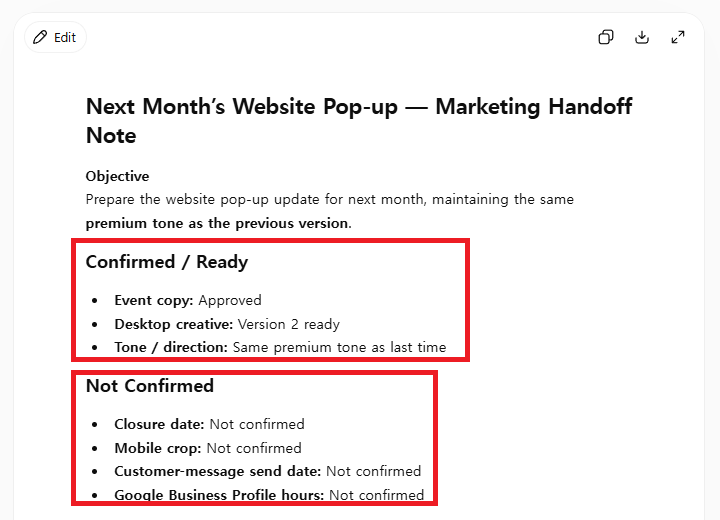
The answer was better than a “bad prompt” demo would suggest. ChatGPT wrote an objective, separated confirmed items from missing ones, and proposed next steps. It didn’t invent the closure date, the mobile crop, the send date, or the business hours.
It still had three weak spots. It treated “premium tone” as a usable direction even though there was nothing to match it against. It mixed desktop and mobile work together. And it never said whether the pop-up was ready to go out. I could use it as an early draft, but not as the final check before publishing.
Turn each weak spot into one rule
This is the step that makes prompts better. Instead of adding general detail, I wrote one instruction for each problem I’d actually seen, plus the basics that every handoff needs:
| What Run A did | The rule I added |
|---|---|
| Picked its own structure | Use exactly four sections: Confirmed inputs, Not confirmed, Required approvals, Next actions |
| Accepted “premium tone” as a spec | Treat the unsupplied tone reference as Not confirmed |
| Mixed desktop and mobile | Keep desktop and mobile assets separate |
| Gave no publishing decision | End with “Publication status: Not ready” |
| (Nothing wrong, but worth locking in) | Use only facts in the note, and don’t invent dates, names, prices, claims, assets, or approvals |
That table is the method. Every line in the new prompt traces back to something I observed. OpenAI’s model guidance for developers recommends the same shape: describe the expected outcome, the success criteria, the evidence rules, and the output format. It’s written for API users, but the idea carried over well to everyday ChatGPT.
Field note: Write down the weak spots before you rewrite anything. If you go straight to editing the prompt, you tend to add adjectives like “professional” and “detailed,” which change the tone and nothing else. A written list forces each new line to fix something specific.
Run B: the rules applied, in a new chat
I opened a new conversation so the first answer couldn’t influence the second, and used the same note with these instructions:
Turn the source note into a pre-publication handoff using exactly these four sections:

1. Confirmed inputs
2. Not confirmed
3. Required approvals
4. Next actions

Use only the facts in the source note. Label every missing item exactly "Not confirmed." Treat the unsupplied tone reference as not confirmed. Keep desktop and mobile assets separate. Do not invent dates, names, prices, medical claims, assets, or approvals. Do not state that the pop-up is ready to publish. End with: "Publication status: Not ready."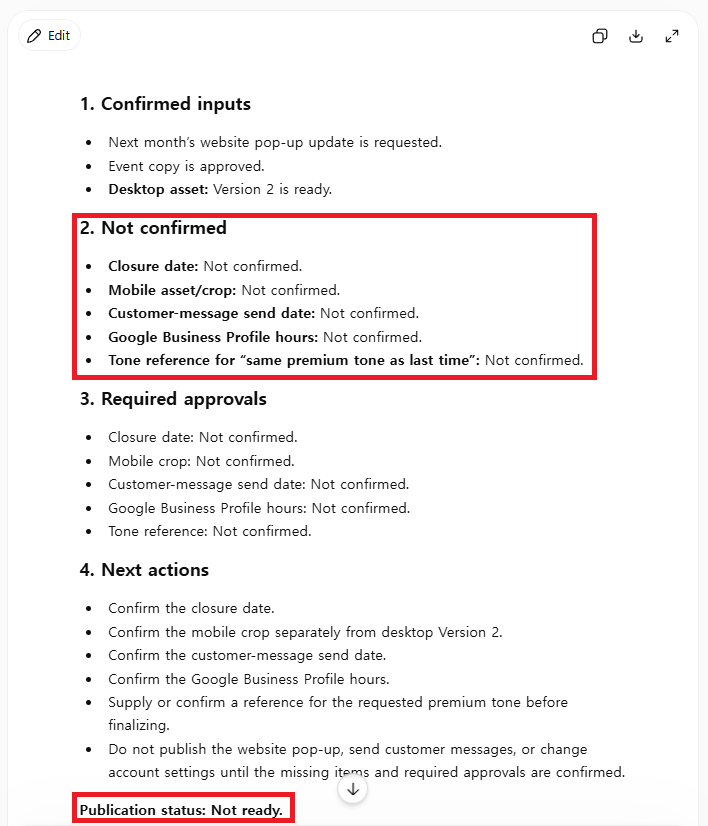
Run B kept both confirmed facts, moved every unresolved detail into “Not confirmed,” gave approvals their own section, and ended with the required status. Most importantly, it listed the tone reference as a gap instead of a direction.
Field note: Ambiguous creative instructions are the easiest thing to miss in review, because they don’t look like missing data. A blank date is obviously blank. “Same tone as last time” looks complete. When a brief points to something that isn’t attached, a reference, a past campaign, “the usual style,” treat it as a blocker until someone sends the file.
| Check | Run A | Run B |
|---|---|---|
| Supplied facts kept | Yes | Yes |
| Missing inputs visible | Yes | Yes |
| Tone reference questioned | Partly | Yes |
| Desktop and mobile separate | Partly | Yes |
| Approvals separate | Partly | Yes |
| Publication stop stated | No | Yes |
Run A wasn’t a failure. It was a respectable first draft. Run B was better for anything that could reach a live website, because there was less left to interpretation and the stop point was written down.
A reusable template
Goal:
[The decision-ready output you need.]

Confirmed inputs:
[Only verified facts and approved assets.]

Not confirmed:
[Missing dates, owners, links, assets, approvals, and any reference that wasn't attached.]

Success criteria:
[What the response must make clear.]

Constraints:
- Do not invent missing information.
- Label unresolved items "Not confirmed."
- Do not publish, send, or change account settings.

Output:
[Required sections and length.]

Stop condition:
[The status to return when evidence is incomplete.]
Scale it to the risk of the task. A brainstorm may only need a goal and an audience. A handoff that touches dates, customer messages, public pages, or business listings needs the evidence rules and the stop condition too.
Field note: Keep the original source note next to the result. Without it, you can’t tell later whether the answer kept the facts or quietly replaced one. For any handoff that goes to someone else, save the note, the prompt, and the output together.
FAQ
Does a longer prompt always give a better answer?
No. Run A was short and already handled several things correctly. Run B was better because each added line fixed an observed problem, not because it had more words.
How do I stop ChatGPT from guessing missing business details?
List the facts you have, require one exact label for anything missing, forbid unsupported dates and approvals, and say what should happen when information is incomplete. Then compare the answer with your source note before anyone uses it.
The takeaway
The biggest improvement wasn’t adding “You are an expert” or more detail. It was turning a casual request into something I could check: these facts, these gaps, this format, and a clear place to stop. If you’re starting out, try the beginner prompt test or the beginner templates. For design-specific mistakes, see common ChatGPT prompt mistakes in design work. OpenAI’s own prompt engineering guide recommends the same loop: write a clear prompt, review the answer, and refine.