The clinic in this article is fictional, and so are its facts. The two screenshots are real outputs from that test packet.
The first answer looked ready to forward. It was a neat, tailored checklist for next month’s clinic marketing update, with sections, priorities, and a confident tone. Then I read it the way a coworker would. The opening sentence was cut off halfway. Several details reflected context I had never put in the prompt. And nothing in it said what still needed approval.
That is the trap most beginners hit when they learn how to use ChatGPT for real work. The risk is usually not a dramatic factual error. It is a polished answer the request could never have supported. So I ran the same task twice, once with the vague sentence most beginners start with and once with a controlled prompt, and compared what each one let a reviewer decide.
The test: one small task with a known answer
I used a fictional monthly marketing update. It has realistic decision points and needs no private data. The packet held two confirmed facts: the September event copy was approved, and version 2 of the desktop pop-up was ready for review. Four things were still unknown: the closure date, the mobile crop, the customer-message send date, and the Google Business Profile hours.
This shape matters more than the topic. Because I already knew what was confirmed and what wasn’t, I could judge the output against a fixed answer instead of my impression of it. “Help me with marketing” can’t be judged. “Turn these approved and missing inputs into a pre-publication checklist” can.
Run 1: the vague prompt
My first request was a single sentence: “Help me prepare next month’s clinic marketing update.” I saved the screen before changing anything. Without a saved baseline, it is easy to remember the first answer as better or worse than it really was.
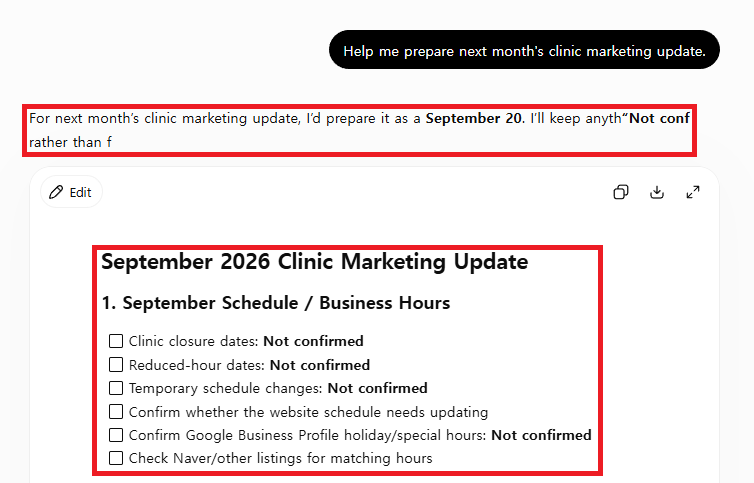
Much of the checklist was useful as a list of categories to think about. It still failed as a draft, and the failure had three separate parts. The clipped opening was a quality problem. The tailored details I hadn’t supplied were a provenance problem: I couldn’t trace them to anything in the request. The missing approval language was a workflow problem, because a coworker could read the checklist as permission to act.
Naming the defects this way changed what I did next. “It felt off” leads to adding adjectives. “It used facts with no source and had no stop point” leads to rules.
Field note: I couldn’t tell from the screen whether Memory, custom instructions, or an earlier conversation shaped that tailoring, so I wrote the question down instead of guessing. If you want to separate prompt quality from account context, rerun the vague prompt in a Temporary Chat. According to OpenAI’s Temporary Chat FAQ, the default non-personalized mode doesn’t use your memories or custom instructions. If the tailoring disappears there, the prompt wasn’t the source of it.
Run 2: replace adjectives with rules
The usual beginner fix is to add words like “professional,” “accurate,” and “detailed.” Those words change the tone. They don’t tell the model which facts it may use, what to do with a missing fact, or when to stop. The controlled version replaces them with instructions you could check:
I am a beginner using ChatGPT for a fictional clinic marketing task.

Confirmed:
- September event copy is approved.
- Desktop pop-up version 2 is ready.

Not confirmed:
- Closure date
- Mobile crop
- Customer-message send date
- Google Business Profile hours

Create a five-item pre-publication checklist.
Label every missing item exactly "Not confirmed."
Do not invent clinic, patient, price, treatment, staff, date,
or approval details.
End with one sentence stating what must not happen automatically.
Each line controls one failure from Run 1. The two lists set the source boundary. The exact label makes uncertainty visible. “Five items” fixes the output size. The list of things not to invent closes the gaps the model filled before. The final sentence adds the stop point the first answer lacked.
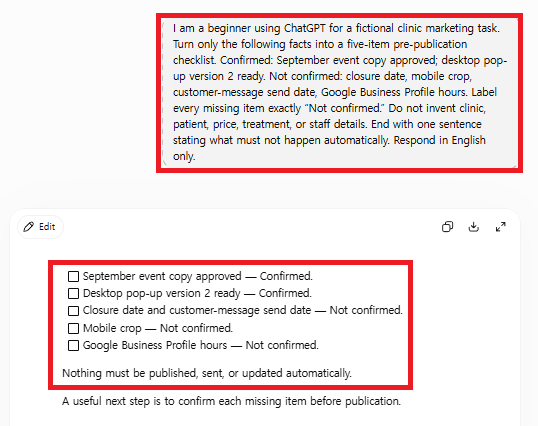
The controlled output kept both confirmed facts. It marked all four unknowns “Not confirmed” and ended by saying nothing should be published, sent, or updated automatically. I could trace every important line back to the packet. That is what made it reviewable.
Field note: The line in the controlled output that mattered most to me wasn’t in the checklist. It was the closing stop sentence. Drafts get forwarded, and the person who receives one rarely sees the prompt behind it. A stop sentence inside the draft travels with it. A rule that only exists in your head doesn’t.
Score the decisions, not the writing
I didn’t judge the two answers on how confident or human they sounded. I judged what each one let a reviewer decide.
| Check | Vague prompt | Controlled prompt |
|---|---|---|
| Source boundary | Not defined | Confirmed and missing facts separated |
| Missing inputs | Easy to overlook | Labeled “Not confirmed” |
| Output shape | Chosen by the model | Five-item checklist |
| Unsupported details | Not prohibited | Named categories prohibited |
| Publication boundary | Unclear | Automatic action explicitly stopped |
| Human review | Implied | Required before use |
The vague prompt was not useless. It was a good way to brainstorm categories I might have forgotten. It just wasn’t something I could hand to a coworker. That difference between helpful and usable is most of what a beginner needs to learn.
What to check before you use any draft
Before I use an AI-assisted draft, I compare it line by line with the source I gave it. I start with anything that could cause harm or can’t be undone: dates, prices, names, links, policy statements, permissions, and publication status. Then I confirm that every missing input is still visibly unresolved. A detail that matters but can’t be verified gets removed or labeled. It never stays in just because it sounds right.
When a result is still weak, I change one rule at a time. I might cut the item count, tighten a label, or move the stop sentence. Changing several things at once makes the output better, but you won’t know which change did it. That guess-and-check loop is also what OpenAI’s prompt engineering guide recommends: write a clear first prompt, review the answer, and refine.
Field note: A longer prompt is not automatically a better one. The controlled prompt above is only about a dozen lines, and each line has a job. Between the two runs, I didn’t add a single descriptive word. Every change was either a missing rule or a hard boundary. When a prompt isn’t working, look for the rule it’s missing before you add more description.
A ten-minute exercise for your first work prompt
Pick a safe task with fictional details where you already know the right answer. Run the vague version once and save the result. Write down each defect as a quality, provenance, or workflow problem. Then rewrite the prompt so each line fixes one defect, run it again, and compare the two with the table above. Finally, check every consequential detail against your source before anything leaves your hands.
It takes about ten minutes, and it teaches more than a list of “magic” prompts, because you see exactly which instruction changed which decision. For more starting points, see these beginner ChatGPT prompt examples. If an answer seems to know things you never told it, read the Memory vs Temporary Chat comparison. Before you paste in any real work file, go through the ChatGPT data controls field test.
FAQ
Should a beginner use a long prompt every time?
No. Use the shortest prompt that still defines the goal, the allowed facts, the missing inputs, the output format, and a stop condition. A long prompt with vague rules can do worse than a short prompt with clear ones.
Does Temporary Chat make answers more accurate?
No. It changes which context ChatGPT can use, not how carefully your prompt is written. Mode and prompt quality are separate variables, and the controlled prompt improved this test because of its rules, not its mode.