Editorial note: The prompt comparison in this guide uses a fictional workday scenario built for this demonstration. No real client, employee, or company data was used.
The best ChatGPT prompts for work do more than produce polished text. They preserve constraints, expose missing information, and leave decisions with the people who are responsible for them.
This guide includes 20 adaptable ChatGPT prompts for work and an auditable editorial demonstration that compares a vague request with a controlled prompt on the same fictional task list.
The demonstration was designed and reviewed by the BJ Creates editor, a working designer who evaluates whether an AI-assisted workflow is clear, actionable, and honest about uncertainty. No client, employee, or company data was used.
Use the templates as starting points rather than finished instructions. Replace the placeholders, remove sensitive information, and check every important output against the source material and your organization’s policies.
Problem Breakdown & Direct Resolution
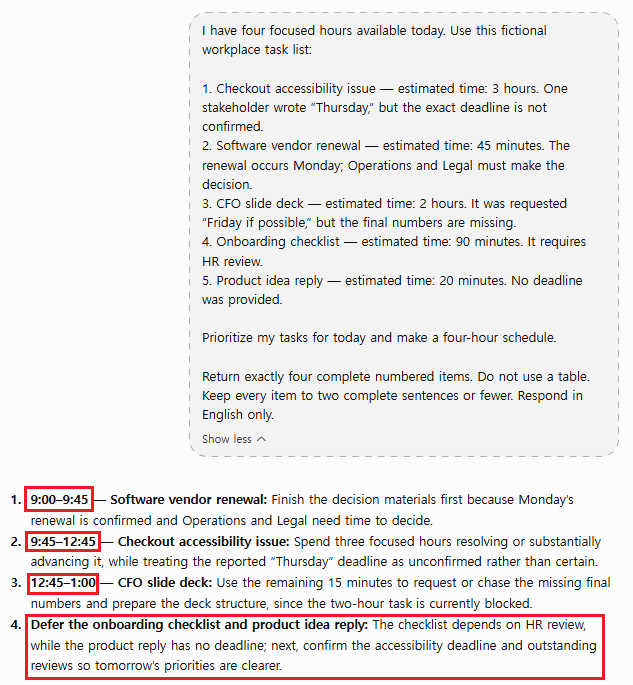
In this comparison, the controlled prompt was safer because it separated confirmed constraints, tentative deadlines, dependencies, and required human confirmation. The vague prompt produced a usable schedule, but it silently chose a 9:00 AM start and treated incomplete timing cues too confidently.
The same fictional workday was used in both runs: five competing tasks, only four focused hours, missing decision-makers, and deadlines that were not all confirmed. The goal was not to make ChatGPT sound polished; it was to see whether the prompt could expose uncertainty instead of hiding it.
Editorial test note
- Test date: August 17, 2026
- Material: A fictional task list created for this guide
- Available capacity: Four focused work hours after meetings
- Review criteria: Evidence, capacity, unsupported assumptions, dependencies, and human decision points
- Output evidence: Abbreviated editorial samples are shown below so readers can inspect the reasoning
- Important limit: AI responses can vary between runs, models, and product versions
Step-by-Step Actionable Troubleshooting
Step 1: Audit the Fictional Task List
Available focused work time today: 4 hours

- Checkout accessibility issue: Keyboard users may be unable to complete a purchase. Estimated work: 3 hours. Engineering wrote "Thursday," but it is unclear whether that is a target or a firm deadline.
- Software vendor renewal: The contract auto-renews Monday. Cancellation terms have not been reviewed. Operations and Legal must make the decision. Estimated internal review: 45 minutes.
- CFO slide deck: Requested "by Friday if possible." Estimated work: 2 hours. Final numbers are not ready.
- Onboarding checklist: A new employee starts next Wednesday. Estimated work: 90 minutes. HR review is required.
- Product idea reply: No deadline. Estimated work: 20 minutes.
Step 2: Run the Vague Prompt
Prioritize my tasks for today and make a schedule.This request encourages a confident-looking answer without defining what counts as urgent. A response may treat “Thursday” and “by Friday if possible” as confirmed deadlines, ignore the four-hour capacity limit, or make the vendor decision on behalf of Operations and Legal. A neat schedule can still be operationally wrong.
Illustrative output from the vague request
The schedule stayed within the four-hour limit, but it silently invented a 9:00 AM start even though no start time was provided. It also combined deferred tasks, dependencies, and follow-up questions in one final item rather than separating confirmed facts from missing information. The answer was usable as a draft, but it was not sufficiently auditable for a real workday.
Step 3: Run the Controlled Prompt
Create a provisional priority plan from the task list.

Rules:
1. Use only the facts provided. Do not invent deadlines, owners, or decision authority.
2. Respect the four-hour focused-work limit.
3. Distinguish confirmed facts, tentative dates, dependencies, and missing information.
4. Use a table with: priority, task, time, evidence, dependency, and human decision needed.
5. Do not make legal, contract, HR, or financial decisions. Flag them for the appropriate owner.
6. If the exact order depends on missing information, provide two short options and explain what must be confirmed before choosing one.
Illustrative output from the controlled request
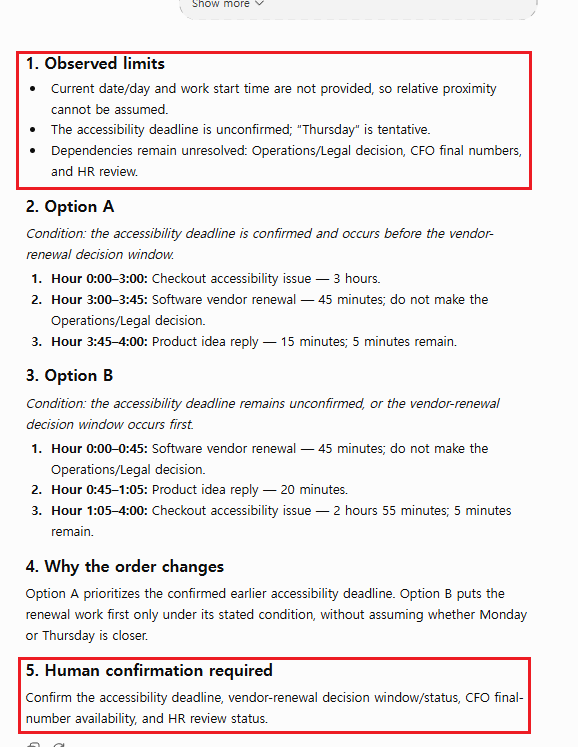
The controlled request first exposed the missing current date, tentative deadline wording, and unresolved dependencies. It then used relative time blocks and two conditional schedules instead of inventing a clock start. A follow-up review was still necessary: the first response compared Thursday with Monday without knowing the current date, and that assumption needed correction before the result could be used.
Specification / Comparison Checklist
| Check | A useful draft should do this | Warning sign |
|---|---|---|
| Capacity | Keep planned focused work within four hours | Schedule every task or ignore estimated time |
| Urgency | Separate firm facts from tentative dates | Present Thursday or Friday as confirmed deadlines |
| Authority | Escalate the renewal to Operations and Legal | Recommend renewing or cancelling the contract |
| Dependencies | Note that the CFO deck needs final numbers and onboarding needs HR review | Treat blocked work as ready to complete |
| Uncertainty | Ask whether the accessibility date is firm and who owns each approval | Fill missing details with plausible guesses |
A responsible draft may offer two possible plans rather than one absolute answer. If Thursday is a firm accessibility deadline, the three-hour fix may take most of the available capacity while the vendor issue is escalated to its owners. If the renewal requires action before Monday, the plan may reserve time to collect the contract facts first. The correct order depends on information the task list does not provide.
Real-World Pitfalls & Pro Tips
- Confirm whether Thursday is a firm deadline or only a target.
- Assign the vendor review to the people authorized to interpret the contract and make the decision.
- Confirm when the CFO numbers will be ready and whether the Friday request is flexible.
- Check the plan against team priorities, availability, and workplace policy before sharing it.
Privacy reminder: This example is fictional. Before entering a real task list, remove client names, employee records, contract terms, credentials, financial data, and unreleased business information unless your organization has approved the tool and workflow.
For recurring work with the same reference files, see our ChatGPT Projects guide. If a response keeps adding unsupported details, use the repair methods in Common ChatGPT Prompt Mistakes.
Before using workplace material, review OpenAI’s Data Controls FAQ and follow your employer’s approved security, retention, and AI-use policies.
Why Use ChatGPT Prompts at Work?
ChatGPT can support professionals in almost every industry by reducing repetitive work and helping generate ideas more efficiently.
With the right prompts, you can:
- Write professional emails
- Plan projects
- Organize meetings
- Summarize documents
- Brainstorm ideas
- Create reports
- Improve communication
- Increase productivity
If you’re new to ChatGPT, start with our beginner guide:
20 Best ChatGPT Prompts for Work
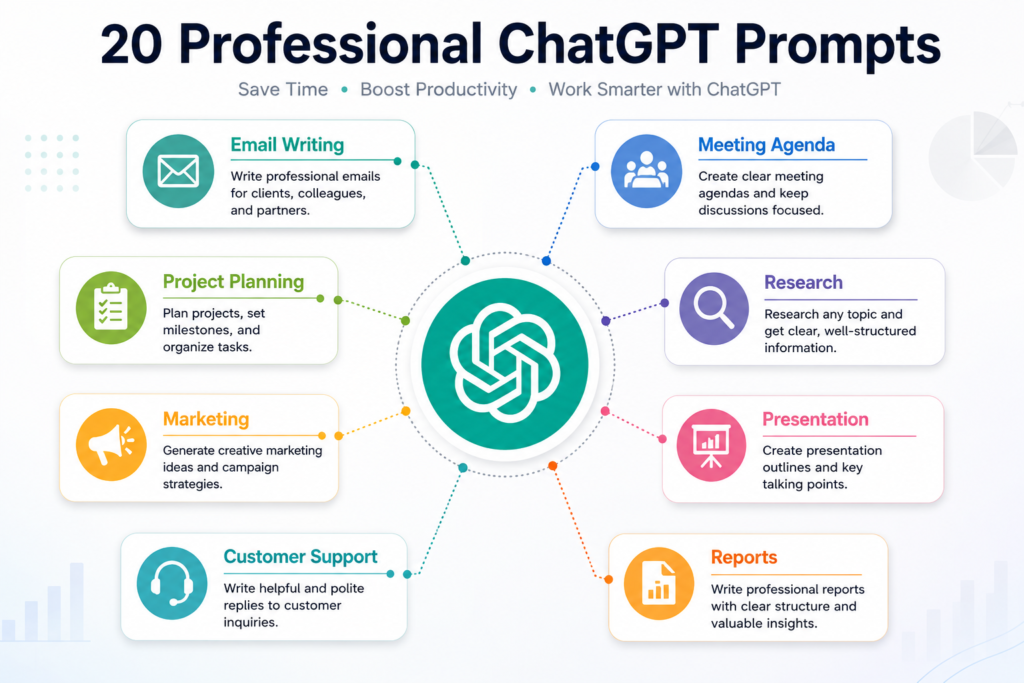
The following best ChatGPT prompts for work cover the most common professional tasks.
1. Write Professional Emails
Writing professional emails often takes more time than expected.
ChatGPT can help you create clear, polite, and well-structured emails for clients, coworkers, and business partners.
Example Prompt
Write a professional email to a client explaining a one-week project delay.

Keep the tone polite, positive, and solution-focused.
You can also ask ChatGPT to make the email shorter, more formal, or friendlier depending on the situation.
2. Create Meeting Agendas
A clear meeting agenda keeps discussions focused and saves time.
ChatGPT can quickly organize meeting topics and priorities.
Example Prompt
Create a one-hour meeting agenda for a weekly marketing team meeting.
Include discussion topics, time allocations, and action items.3. Summarize Meeting Notes
After meetings, organizing notes into clear summaries can be time-consuming.
ChatGPT can identify the most important points and generate action items.
Example Prompt
Summarize these meeting notes into five key takeaways and create a list of action items.4. Plan Projects
Managing projects becomes easier when tasks are organized into clear steps.
ChatGPT can help build project timelines and task lists.
Example Prompt
Create a project plan for launching a new company website within six weeks.

Include milestones, deadlines, and responsibilities.
5. Organize Weekly Tasks
Professionals often juggle multiple priorities.
ChatGPT can organize tasks based on urgency and importance.
Example Prompt
Create a weekly work schedule based on these tasks.

Prioritize urgent work while balancing meetings and focused work sessions.
6. Brainstorm New Ideas
Generating fresh ideas is easier when you have an AI brainstorming partner.
ChatGPT can suggest multiple creative approaches to the same problem.
Example Prompt
Generate ten creative marketing ideas for a new coffee shop targeting young professionals.
Include both online and offline marketing strategies.
7. Research Topics Faster
Research often involves reading multiple articles and comparing information.
ChatGPT can summarize concepts and explain complicated topics in simple language.
Example Prompt
Explain blockchain technology for business professionals using simple language and practical examples.8. Analyze Business Data
ChatGPT can help interpret reports and identify patterns within business data.
Always verify important decisions using reliable data sources.
Example Prompt
Analyze this quarterly sales report and identify the three most important business insights.9. Write Professional Reports
Reports should be clear, organized, and easy to understand.
ChatGPT can improve clarity and structure.
Example Prompt
Rewrite this project report using a professional business tone.

Organize the content into clear sections with headings.
10. Create Presentation Outlines
Instead of starting from a blank page, ChatGPT can quickly generate presentation structures.
Example Prompt
Create a 10-slide presentation outline about digital marketing trends in 2026.

Include key talking points for each slide.
11. Generate Marketing Ideas
Marketing teams constantly need fresh campaign ideas and promotional strategies.
ChatGPT can generate creative ideas based on your target audience, industry, and business goals.
Example Prompt
Generate 15 marketing campaign ideas for a cosmetic clinic targeting women in their 30s.

Include social media, email, and offline marketing ideas.
Providing your audience and business goals will produce much more relevant ideas.
12. Reply to Customer Messages
Responding to customer inquiries consistently can improve customer satisfaction.
ChatGPT can help create professional and friendly responses for emails, live chat, and customer support.
Example Prompt
Write a polite reply to a customer requesting a refund.

Show empathy, explain the company policy, and offer an alternative solution.
13. Write Social Media Posts
Creating engaging social media content every day can be challenging.
ChatGPT can generate captions for Instagram, LinkedIn, Facebook, Threads, and X.
Example Prompt
Write five LinkedIn posts promoting AI productivity tools.

Use a professional tone and include a question to encourage engagement.
14. Create Blog Outlines
Planning a blog becomes much easier when you have a clear structure before writing.
ChatGPT can generate SEO-friendly outlines that organize your ideas logically.
Example Prompt
Create an SEO-friendly blog outline for the topic "Benefits of Artificial Intelligence for Small Businesses."

Include H2 and H3 headings.
15. Perform a SWOT Analysis
A SWOT analysis helps evaluate strengths, weaknesses, opportunities, and threats.
ChatGPT can quickly organize information into a clear business framework.
Example Prompt
Create a SWOT analysis for a small online clothing business entering a competitive market.16. Create Standard Operating Procedures (SOPs)
Well-written SOPs help teams maintain consistency.
ChatGPT can organize step-by-step workflows into professional documentation.
Example Prompt
Create a standard operating procedure for onboarding a new employee in a marketing department.17. Prioritize Daily Tasks
Managing multiple deadlines becomes easier when tasks are properly prioritized.
ChatGPT can organize work using urgency, importance, and estimated completion time.
Example Prompt
Prioritize these tasks using the Eisenhower Matrix and explain why.18. Translate Business Documents
ChatGPT can translate documents while keeping a natural business tone.
Always review important translations before sending them to clients.
Example Prompt
Translate this business proposal into professional English while maintaining a formal tone.19. Prepare Interview Questions
Hiring managers can use ChatGPT to generate interview questions for different positions.
Example Prompt
Create ten behavioral interview questions for hiring a digital marketing specialist.20. Compare Business Decisions
Sometimes choosing between multiple options can be difficult.
ChatGPT can compare advantages and disadvantages objectively.
Example Prompt
Compare the advantages and disadvantages of outsourcing customer support versus hiring an in-house team.

Present the answer as a comparison table.
Tips for Writing Better Work Prompts
Give Clear Instructions
The clearer your instructions, the better ChatGPT can understand your request.
Avoid vague prompts and explain exactly what you want to achieve.
For more prompt-writing tips, read our guide:
10 Common ChatGPT Prompt Mistakes
Provide Enough Context
Include useful background information whenever possible.
Helpful details include:
- Your goal
- Your audience
- Your preferred format
- The desired tone
- Any important limitations
For more ready-to-use examples, check out:
Best ChatGPT Prompts for Beginners
Keep Improving the Conversation
Your first prompt doesn’t have to be perfect.
Ask ChatGPT to rewrite, shorten, expand, simplify, or improve its previous response.
The best results usually come from an ongoing conversation rather than a single request.
FAQ Section
How should I handle an unconfirmed deadline in a work-priority prompt?
Label it as tentative, ask who can confirm it, and request conditional schedules instead of letting ChatGPT turn the date into a fact.
Can I paste real employee or client data into these prompts?
Do not paste confidential names, contact details, credentials, private customer records, or unpublished business data. Replace them with fictional labels and follow your organization’s data policy.
What must a person verify before using ChatGPT’s work schedule?
Verify deadlines, time estimates, dependencies, decision owners, and the authority to act. ChatGPT can organize a draft, but it cannot confirm facts that were never supplied.
What This Decision Test Changes
The best ChatGPT prompts for work are not necessarily the longest prompts. The most useful ones make the evidence, constraints, dependencies, and decision authority explicit.
In the editorial demonstration, the vague request produced a clean-looking schedule that exceeded capacity and hid uncertainty. The controlled prompt produced a less convenient answer, but it preserved the four-hour limit and showed exactly which facts a person still needed to confirm.
For low-risk drafting, a short template may be enough. For project, contract, HR, financial, accessibility, or client-facing work, use a controlled prompt and review the result against the original material before acting.
For a workspace that keeps approved reference files and instructions together, continue with the ChatGPT Projects guide. To repair prompts that invite unsupported assumptions, see Common ChatGPT Prompt Mistakes.
ChatGPT is developed by OpenAI. Product behavior can change, so confirm current features and data settings through the official OpenAI Help Center.