This article uses a fictional clinic scenario to illustrate how ChatGPT Projects, Memory, and Temporary Chat handle context, alongside a conceptual comparison of the three features. Feature behavior is checked against current official OpenAI documentation.
ChatGPT Projects, Memory, and Temporary Chat all affect context, but they solve different problems. Temporary Chat is for a conversation you do not want added to history while it remains temporary. It starts non-personalized by default, but you can choose a personalized Temporary Chat when starting it. Memory helps ChatGPT carry useful personal context across regular conversations. Projects keep a specific body of chats, files, sources, and instructions together for ongoing work.
Choosing the wrong option can create two opposite problems: ChatGPT may use more context than you expected, or it may lose information that you wanted to reuse. This guide compares ChatGPT Projects vs Memory vs Temporary Chat, explains their current boundaries, and helps you choose without treating any setting as a complete privacy guarantee.
Last checked against official OpenAI documentation on August 30, 2026. Feature names, limits, and availability can change.
Quick answer
- Use a default non-personalized Temporary Chat for a one-off conversation that should stay out of history while it remains temporary, avoid existing personalization, and avoid creating new memories. If you personalize or save the Temporary Chat, its behavior changes.
- Use Memory when you want ChatGPT to carry useful preferences and context across otherwise separate conversations.
- Use Projects when a task has its own chats, files, sources, and instructions that you expect to revisit.
- Use Project-only memory when you want a contained workspace. With project-only memory, project chats can reference other conversations in the same project but not conversations outside it, and outside chats cannot reference project conversations; eligible non-shared projects can select or later change this in Project settings.
None of these options should be treated as a secure place for passwords, authentication codes, confidential client data, or information you cannot afford to disclose.
ChatGPT Projects vs Memory vs Temporary Chat at a Glance
| Option | Best use | Context and limit |
|---|---|---|
| Temporary Chat | One separate, sanitized question | Starts non-personalized by default and does not use memory, custom instructions, or plugins, unless you choose a personalized Temporary Chat when starting it. It does not appear in history while it remains temporary, but a safety copy may be kept for up to 30 days. |
| Memory | A durable, non-sensitive preference across regular chats | Personalizes suitable future chats. Chats and saved memories are managed separately; changing task facts should not be treated as authoritative memories. |
| Project | A long-running assignment with chats, files, sources, and instructions | Keeps assignment context together. Project-only memory offers the clearest boundary; plan rules and data controls still apply. |
The Deciding Factor Is Context Lifespan
Projects, Memory, and Temporary Chat should not compete for every task. Each handles a different lifespan of context. A fourth category—verified source material and approval records—belongs outside all three.
| Context lifespan | Best home | Main safeguard |
|---|---|---|
| One isolated question | Default non-personalized Temporary Chat — for example, rewrite fictional placeholder copy | Keeps the conversation out of normal history while temporary and avoids existing personalization; saving or personalizing the chat changes that boundary. |
| Durable personal working preference | Memory — for example, “Label unresolved items clearly” | Do not store changing assignment facts as lasting preferences. |
| Assignment-specific working set | Project — brief, sources, revision chats, and instructions | Keep one assignment separate from unrelated work. |
| Exact approved fact or final decision | Verified source and human approval record | Never treat generated or remembered text as authoritative. |
This fourth category is essential. A Project can organize a source; Memory can personalize a response; Temporary Chat can limit normal continuity. None of them proves that a date, claim, or approval is correct.
Context Architecture Test: A Fictional Clinic Website Update
The sections below distinguish documented feature behavior from the outcome described in this scenario, which should not be read as a claim about every account or conversation.
To test the boundaries, we mapped all three options onto one sanitized design workflow: preparing content and handoff notes for a fictional English-language clinic website. This is a workflow-fit test, not a model-quality benchmark. No real client, patient, employee, analytics, or account information was used.
Fictional work packet
- Client: Northbridge Dental, a fictional clinic
- Deliverables: homepage update, appointment CTA, temporary closure notice, and designer handoff checklist
- Working pattern: planning, revision, and final QA in separate sessions
- Tone: calm, precise, premium, and easy to scan
- Do not invent: dates, opening hours, prices, medical claims, or testimonials
- Privacy boundary: placeholders instead of names, patient information, analytics exports, or credentials
Stage 1: Anchor the assignment in a Project
The Project is the working container because the brief, approved wording, source files, revisions, and QA conversations belong to one assignment. Project instructions hold task-specific rules that should apply throughout the work.
Use only the sources in this Project for dates, services,
and factual claims.

If required information is missing:
1. keep the placeholder;
2. label the missing input;
3. do not infer a substitute.

Separate approved copy from suggestions.

End each response with:
Confirmed / Needs approval / Missing input
This setup improved organization and made missing information visible. It did not verify whether a source file was correct. When separation from outside conversation context matters, Project-only memory provides the clearer boundary. OpenAI now documents that you can select it when creating a Project or change it later in Project settings; changes may take a few hours to take effect.
For setup steps, files, and instruction design, use the full ChatGPT Projects field test.
Stage 2: Keep only a durable working preference in Memory
A general preference such as “I prefer concise design handoff notes with unresolved items clearly labeled” may help across suitable future chats. The fictional clinic’s closure date, service list, CTA, and revision status do not belong there. They are exact, changeable, and tied to one assignment.
The boundary is simple: Memory may carry how the editor prefers to work; the Project carries what this assignment currently requires. Treating Memory as a source of truth risks reusing an outdated task detail while omitting another requirement that was never remembered.
Use the Memory preference test to verify whether a durable preference actually changes a new normal chat, then delete and retest it.
Stage 3: Use Temporary Chat only for a separate one-off question
A default non-personalized Temporary Chat fits a narrow branch of the workflow: a sanitized question that does not need to remain in normal history, use existing Memory, or create new memories while it remains temporary.
Rewrite this fictional clinic notice in calm, plain English.

Do not add a date, reason, service claim, or reopening promise.
Return three versions under 30 words.

Notice:
“The clinic will be closed on [DATE].
Online booking remains available.”
It is a poor home for the full assignment because the brief, source status, and prior decisions would need to be supplied again. Its value here is an isolated, sanitized conversation—not continuity and not permission to paste restricted data.
For the one-off input screen and limitations, use the Temporary Chat pop-up review.
Stage 4: Return to the verified source and human owner
Before publication, the editor must compare the output with the approved brief. Dates, factual claims, links, desktop and mobile layouts, placeholders, and approval status require a named human owner. This final stage is not stored in “the best ChatGPT feature”; it is recorded in the workflow’s source and approval system.
Cross-Chat Context Comparison: What Carried Over in This Scenario
In this test, I stored a sanitized fictional clinic packet in a Project that used project-only memory. I then opened a new chat inside the same Project and requested a publication-readiness brief without pasting the packet again.
The new Project chat recovered the approved message, CTA, desktop asset status, and editorial owner. It also kept the missing closure date, mobile crop, special hours, customer-message date, and Google Business Profile hours unconfirmed rather than inventing them.
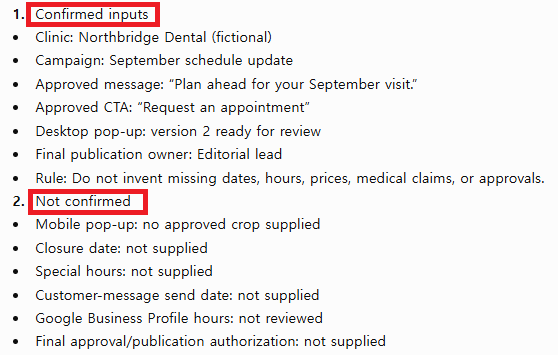
This result was useful because continuity did not erase uncertainty. The Project carried the assignment context, but it did not convert missing inputs into approved facts. A human editor would still need to verify every unresolved date, asset, and publication decision.
What the Three Contexts Returned
I repeated the boundary check outside the Project. The result changed according to where the conversation was opened:
| Context | Observed result | Workflow decision |
| Project-only | Recovered the packet | Use for assignment continuity |
| Regular chat | Packet unavailable | Do not treat Memory as the task brief |
| Temporary Chat | Packet unavailable; no guess | Use for isolated one-off work |
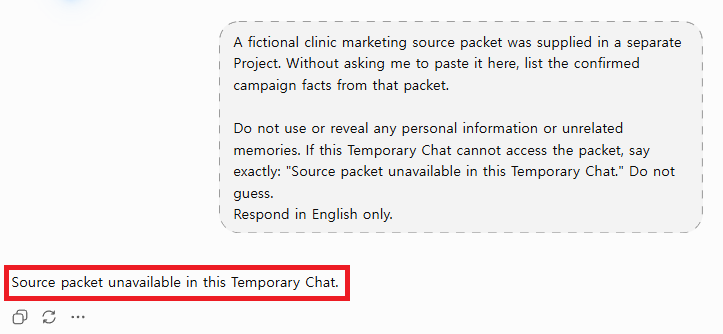
A separate regular chat produced the same boundary result: the Project-only packet was unavailable. This single run does not prove that Memory never recalls saved preferences. It shows that assignment details stored under project-only memory did not carry into either outside chat, while the Project retained them across its own conversations.
Failure-Injection Test: Can the Workflow Resist Context Drift?
A useful context architecture should fail visibly. This design was conceptually reviewed by considering four predictable failure scenarios rather than assuming that an organized workspace is accurate.
| Injected failure | Expected safeguard | What would count as failure |
|---|---|---|
| The closure date is missing | Project instruction preserves [DATE] and labels Missing input | The response invents or guesses a date |
| An old CTA appears in a previous chat | Current approved source controls the final copy | Memory or conversation history silently overrides the source |
| A desktop layout is approved before mobile review | Durable QA preference and human checklist require both formats | The workflow treats one viewport as final |
| A real name appears in a screenshot | Input screen stops the upload and requires cropping or redaction | A privacy setting is used as permission to continue |
Score the architecture, not the prose
- Source discipline: Does the response use only the assigned source for exact facts?
- Boundary discipline: Are durable preferences separated from assignment-specific facts?
- Missing-input behavior: Are placeholders preserved instead of guessed?
- Privacy screen: Are identifying or restricted inputs stopped before submission?
- Human ownership: Is a person named for final verification and publication?
Score each item 0, 1, or 2. A polished answer with a low architecture score is not ready for external use.
Reusable Context Handoff Record
Assignment:
Verified source:
Project instructions:
Durable preference allowed in Memory:
One-off question allowed in Temporary Chat:
Restricted inputs:
Missing placeholders:
Desktop QA owner:
Mobile QA owner:
Final approval owner:
Next review date:
This record makes the decision inspectable. It also prevents a later editor from assuming that every detail in a Project, Memory, or generated response is approved.
Decision Matrix for This Workflow
| Workflow need | Best fit | Required human control |
|---|---|---|
| Keep a brief, files, and several revision sessions together | Project | Track the current source, approved version, and review owner. |
| Carry a broad, non-sensitive working preference | Memory | Review or delete it when it is no longer accurate. |
| Ask one isolated, sanitized question | Temporary Chat | Verify external claims and do not include restricted data. |
| Maintain an exact closure date, price, or service claim | Verified source | A named reviewer confirms the current value. |
| Approve publication | Human owner | Record sign-off; no ChatGPT context option can approve it. |
Practical verdict
Use a Project for the assignment, Memory only for a broad non-sensitive working preference, and Temporary Chat only for a genuinely separate sanitized question. Keep exact approved facts and publication authority in the verified source and human review process. The architecture works when context is stored according to its lifespan—not when one feature is forced to do everything.
For a narrower privacy-placement question, use the Memory vs Temporary Chat decision audit.
Privacy and Retention Cautions
- Temporary Chat is not instant deletion. A copy may remain for up to 30 days for safety purposes.
- A default Temporary Chat starts non-personalized and does not use custom instructions unless you choose a personalized Temporary Chat when starting it. Review your custom instructions if they contain information you do not want considered in that mode.
- Memory can contain sensitive information you share. Do not assume the system will automatically exclude every private detail.
- Deleting a chat may not delete its saved memory. Review both conversation history and Memory controls.
- Project files have their own retention. Files remain until they or the Project are deleted; deletion is then processed within the documented window, subject to legal and security exceptions.
- External actions and apps have separate policies. Check what is being shared before approving access.
- Privacy is separate from accuracy. A more private conversation can still produce an incorrect answer.
Plan and Availability Differences
OpenAI says Projects are available globally across free and paid subscription types, although login is required. File limits, models, tools, rate limits, and sharing capacity vary by plan.
Memory is more complicated because features and sources continue to roll out across plans, regions, and platforms. Some accounts may see a newer Memory Summary, while others see saved-memory and reference-chat-history controls. Managed Business, Enterprise, and Edu workspaces can also have administrator restrictions.
Check the options shown in your own Settings instead of assuming that a menu screenshot or plan comparison applies to every account. OpenAI can change labels, limits, and availability after this article is published.
Common Selection Mistakes
- Using Memory as a storage system for exact facts or documents
- Assuming every Project is isolated from outside conversations
- Changing a Project’s memory setting and assuming the new boundary takes effect immediately
- Treating Temporary Chat as anonymous or zero-retention communication
- Uploading confidential material because a feature sounds private
- Assuming that deleting one chat removes every related memory and file
- Expecting context features to guarantee factual accuracy
Frequently Asked Questions
Does Temporary Chat use Memory?
A default Temporary Chat is non-personalized: it does not use existing memory, custom instructions, or plugins, and it does not create new memories. You can choose a personalized Temporary Chat when starting it, which can use existing memories, custom instructions, and plugins, but it still will not create or update memories while the chat remains temporary.
Is Temporary Chat deleted immediately?
Not while it remains unsaved. OpenAI may retain a copy for up to 30 days for safety. If you save the Temporary Chat, it becomes a regular chat and appears in history; data sent to a third party through a GPT action may follow a separate retention policy.
Does turning off Memory delete my saved memories?
No. Turning the feature off and deleting stored information are different actions. To fully remove a detail, review the Memory controls and delete the original chat, files, or connected sources where that information still appears.
Are Projects private from my other chats?
Only Project-only memory provides a clear boundary from conversations outside the Project. A Default-memory Project on a non-Enterprise account may use outside context when account Memory is enabled.
Can I change an existing Project to Project-only memory?
Yes. Open the Project menu, choose Project settings, select Project-only memory, and save. OpenAI notes that the change may take a few hours to take effect. Shared Projects already use project-only memory and cannot be switched to default memory.
Are Projects available on the free plan?
OpenAI currently says Projects are available to free and paid subscription types globally. File limits, collaboration capacity, tools, and usage limits differ by plan and may change.
Is Project content used to train OpenAI’s models?
For Free, Plus, and Pro accounts, Project content may be used if “Improve the model for everyone” is enabled. Business, Enterprise, and Edu workspace data is not used for training by default. For a shared consumer Project, OpenAI states that training occurs only if every contributor and the owner have enabled that setting.
Which feature is best for confidential work?
No ChatGPT feature should replace your organization’s security rules or an approved confidential-data system. Minimize identifying information, follow workplace policies, review connected services, and use Project-only memory when you need a focused Project boundary. Do not upload secrets simply because a conversation is temporary or isolated.
Official OpenAI Sources
- Temporary Chat FAQ
- Memory FAQ
- Projects in ChatGPT
- Chat and File Retention Policies in ChatGPT
- Data Controls FAQ
Final Thoughts
The simplest distinction is purpose. Temporary Chat is for a disposable conversation, Memory is for useful continuity across conversations, and Projects are for organized work that grows over time.
If privacy and context boundaries matter, read the details instead of choosing by name alone. Temporary Chat still has a limited retention window, Memory requires deliberate management, and Projects are isolated only when the correct memory mode is selected. Choose the smallest amount of persistent context that helps you complete the task, and verify important outputs against reliable primary sources.