The brief in this test is fictional and sanitized. No real clinic, patient, customer, employee, date, link, or approval data was used.
Use ChatGPT Study Mode when the goal is to expose gaps in your reasoning, not when you only want a finished answer. In my August 22, 2026 field test, it became useful only after I required five questions one at a time, prohibited invented project details, and requested a final review rubric.
I tested it with a sanitized version of a recurring design-and-marketing problem: adapting a 1600 × 900 desktop promotion into a 1080 × 1350 mobile asset. The brief required a closure date, a short notice, and one call to action, but no real clinic, patient, customer, employee, date, link, or approval data was used.
The direct result was useful but limited. Study Mode questioned my decisions about hierarchy, typography, image cropping, safe margins, the CTA, and final mobile QA. It correctly left unknown production details unresolved and ended with “Publication status: Not ready.” It did not create or approve a production asset, which was the correct outcome for this test.
Field-test verdict
Study Mode improved the structure of the review because it made me justify one decision before moving to the next. Its value was not “better-looking copy.” Its value was the sequence of questions and the visible boundary between confirmed reasoning and still-unverified production inputs.
Field Test Setup and Sanitized Brief
I chose a mobile adaptation task because it is familiar enough for me to judge the quality of the questions. In actual marketing work, a desktop image can look acceptable while its mobile crop hides the subject, clips text, reduces the CTA to an unsafe touch target, or preserves an incorrect date. A useful learning assistant should make those decisions visible instead of jumping directly to a polished mock-up.
The test brief intentionally included only structural facts:
- Desktop promotion: 1600 × 900 pixels
- Mobile promotion: 1080 × 1350 pixels
- Required content: one closure date, one short notice, and one CTA
- Visual goal: calm, premium, and easy to scan
- Constraint: a wide background image and small supporting text
I then added an important control: ChatGPT could not invent brand rules, dates, copy, links, or approvals. The task was to teach through five questions, wait for each answer, give a hint before correcting a weak answer, and finish with strengths, unresolved decisions, and a six-item rubric.
I work in design and marketing and want to test whether Study Mode improves my reasoning when adapting a desktop website promotion for mobile.

Use this fictional brief:
- Desktop promotion: 1600 × 900 pixels
- Mobile promotion: 1080 × 1350 pixels
- Required content: one closure date, one short notice, and one call to action
- Visual goal: calm, premium, and easy to scan
- Constraint: the desktop version uses a wide background image and small supporting text

Do not create the final design for me. Teach me through five questions, one at a time. Help me reason about information hierarchy, typography, image cropping, safe margins, the call to action, and final mobile QA.

After my fifth answer, provide:
1. what I understood well,
2. the decisions I still need to justify,
3. a six-item review rubric.

If an answer is weak, give one hint before explaining it. Do not invent brand rules, dates, copy, links, or approvals. Use fictional information only. Respond in English.
How the test ran, question by question
Step 1: Open Study Mode in a supported conversation
I opened Study Mode from the direct Study Mode page in a regular ChatGPT conversation. How you turn it on, and which plans and apps include it, can change, so check OpenAI’s Study Mode help page if the option doesn’t appear on your screen. Study Mode is built to ask questions, guide reasoning, and check understanding rather than hand over a finished answer, which is exactly what this test needed.
Step 2: Require one question at a time
A broad request such as “teach me mobile design” gives the model too much control over the lesson. I specified five questions and required one answer before the next question. That constraint mattered: the session paused after hierarchy, reacted to my answer, and only then moved to typography.
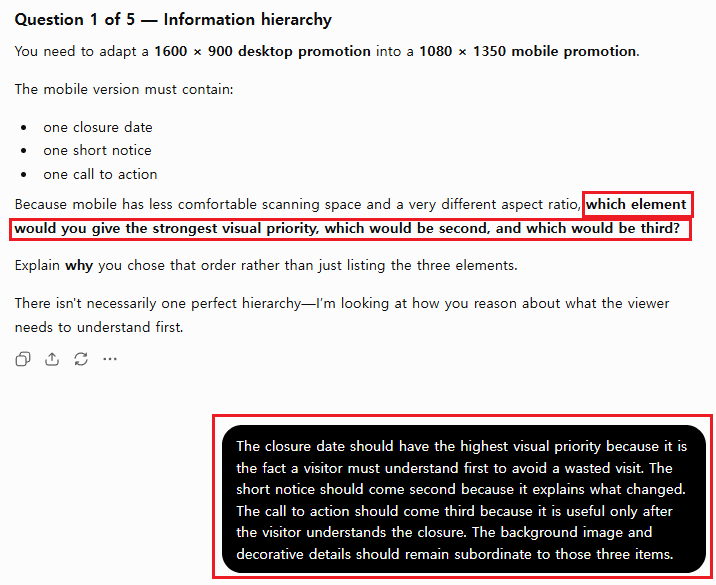
The first question asked what visitors must understand first. I answered that the closure date should lead, the short notice should explain the change, and the CTA should come after the situation is understood. The background image and decoration should remain subordinate. Study Mode accepted the reasoning and restated the sequence as closure date → notice → CTA → image/decorative elements.
Step 3: Test typography as a relative system
The second question did not ask for invented font sizes. It asked how the relative size, weight, line length, wrapping, and spacing should change on mobile. My answer kept the closure date largest, shortened it to no more than two lines, used smaller regular or medium-weight notice text, and separated the CTA through position and button treatment rather than making it compete with the date.
The most practical conclusion was to shorten supporting copy before shrinking the type. In my work, crowded mobile artwork often begins with trying to preserve every desktop sentence. That is usually a copy-priority problem before it is a font-size problem.
Step 4: Refuse to approve an unseen crop
The third question introduced an important unknown: the wide source image contained a visually important subject, but its position had not been confirmed. I would not approve a crop without inspecting the image. I would create a separate mobile composition, test multiple crops, protect the subject, place text in a quiet high-contrast area, keep generous safe margins, and review the work at realistic mobile display size.
If one wide image cannot provide both a strong subject crop and readable text, forcing the crop is the wrong solution. I would request another image, extend only nonessential background space with careful QA, or move the copy into a separate panel. Study Mode added one useful warning: any background extension also needs inspection for broken detail, distortion, or artificial-looking texture.
Step 5: Treat the CTA and mobile preview as release gates
The fourth question tested the CTA. I placed it after the closure date and notice so the viewer first understands the situation and then sees the next action. Before approval, I would require the exact CTA copy, destination URL, intended action, brand button treatment, mobile landing-page behavior, and any tracking requirement. Missing information stays Not confirmed; it does not receive placeholder copy or a guessed link.
The fifth question required a complete QA sequence. My order was: verify source facts; inspect scan order; check spelling, wrapping, contrast, and text size; inspect the crop and subject integrity; test several mobile widths; test the CTA destination; and compare desktop and mobile for factual consistency. The mobile asset should preserve the communication objective and visual character, not copy the desktop geometry.
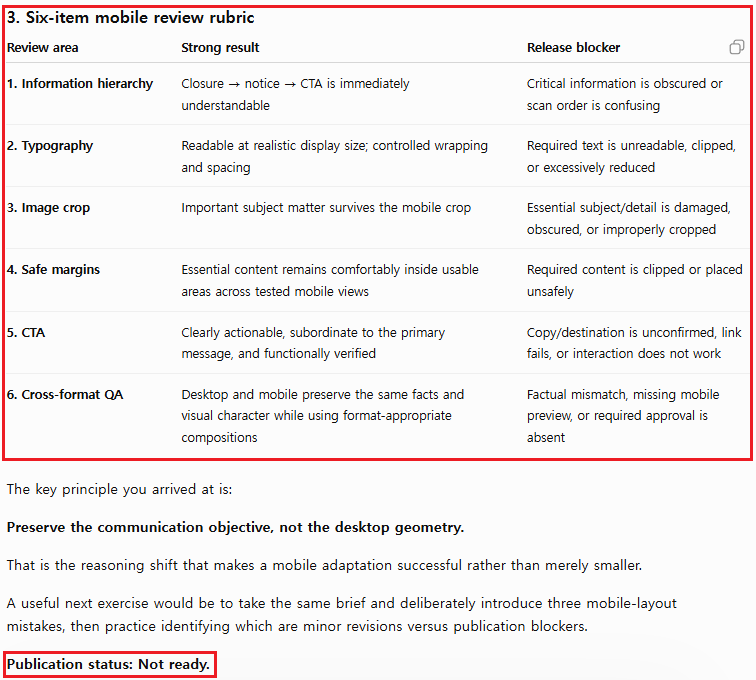
The final response correctly separated minor revision notes from publication blockers. Spacing and decorative refinements could remain open, but an unconfirmed date, unapproved copy, broken URL, clipped text, damaged image, unsafe crop, missing preview, nonfunctional CTA, or missing owner approval should stop release.
What the Field Test Returned
| Test stage | Observed behavior | My decision |
|---|---|---|
| Hierarchy | Asked what visitors must understand first | Useful: forced a communication priority |
| Typography | Asked for relative decisions, not fixed sizes | Useful: focused on density and wrapping |
| Image crop | Kept subject position unconfirmed | Useful: did not approve an unseen crop |
| CTA | Exposed missing copy, link, and rules | Useful: preserved approval boundaries |
| Final QA | Produced a six-item release rubric | Reusable after human verification |
This was one run, not proof that every model, plan, device, or future interface will behave identically. Study Mode can still make mistakes, accept weak reasoning, or provide a direct answer. The important result was narrower: under a controlled prompt, it maintained the lesson sequence, responded to each decision, surfaced unknown production inputs, and generated a usable review framework.
I also did not treat praise from the model as evidence that the design decision was correct. I checked each answer against the practical workflow considerations I rely on for desktop-to-mobile marketing asset adaptation. The model’s feedback becomes valuable only after a person with relevant experience evaluates it.
Field note: Don’t treat the model’s praise as a score. At the end of the session, Study Mode told me what I had understood well, and it was encouraging. That’s useful for motivation, but it isn’t evidence. Compare each answer against a rubric you wrote before the session, and keep dates, links, copy, and owners unconfirmed until a person verifies them.
A few habits made the test safer. I asked Study Mode to question the decisions behind the asset instead of asking for the asset itself. I sanitized the brief before pasting it, with no patient, customer, or employee information. I reviewed the mobile composition on its own rather than treating a shrunken desktop layout as mobile. And before publishing the screenshots, I cropped out unrelated chats and anything that identified my account.
A mobile QA rubric you can reuse
| Review area | Pass condition | Release blocker |
|---|---|---|
| Information hierarchy | Date → notice → CTA is immediately clear | Critical information is obscured |
| Typography | Readable at realistic mobile size | Required text is clipped or too small |
| Image crop | Important subject survives the crop | Subject or detail is damaged |
| Safe margins | Essential content stays inside usable areas | Content touches unsafe edges |
| CTA | Copy, destination, and action are verified | Link or behavior is unconfirmed |
| Cross-format QA | Desktop and mobile preserve the same facts | Factual mismatch or approval is missing |
Reusable Study Mode Prompt
Replace the bracketed items with sanitized facts. Do not paste information you are not authorized to share.
If you want to avoid retyping this prompt each time, consider turning this review process into a repeatable rule.
I want to test my reasoning about [specific task].

Confirmed brief:
- Goal: [goal]
- Required output: [output]
- Known constraints: [constraints]
- Unknown or unapproved items: [unknowns]

Do not complete the final work for me. Ask [number] questions, one at a time, about [decision areas]. Wait for my answer before moving on.

If my answer is weak, give one hint before explaining it. Do not invent missing dates, copy, links, rules, evidence, or approvals.

After the final question, provide:
1. what I understood well,
2. decisions I still need to justify,
3. a [number]-item review rubric with pass conditions and blockers.
When Study Mode Is the Wrong Tool
I would not use Study Mode for a simple formatting request, a task with no learning objective, or a production action that must be executed exactly from an approved specification. A normal chat may be faster for drafting or restructuring known content. For confidential or regulated material, follow your organization’s data rules and use sanitized examples unless the environment and permissions have been explicitly approved.
Study Mode also does not replace a subject expert, teacher, designer, editor, or final approver. Its questions can help reveal assumptions, but the person responsible for the work must verify the source material and own the release decision.
For recurring production QA rather than one-off reasoning practice, see the same review logic applied to a monthly marketing QA workflow.
FAQ
Can ChatGPT Study Mode create the final design?
It can discuss or help plan a design, but this field test intentionally prohibited final asset creation. I used it to test reasoning and identify approval blockers. The actual image, mobile preview, copy, links, and owner approval still require separate production and verification.
Does Study Mode always ask questions one at a time?
No. Its behavior can vary, and it may sometimes give a direct answer instead. In this test, the explicit instruction to ask five questions one at a time produced the requested sequence. Treat that as an observed result from one run, not a guarantee.
Can I use real business or customer information in a Study Mode test?
Only if you are authorized to share it and your organization’s data policy allows it. For this article, I used a fictional clinic-marketing brief and excluded all real names, dates, messages, patient details, customer information, links, and approvals.
The verdict
Study Mode was useful for this mobile design reasoning test because it slowed the task down at the right places. It made me explain hierarchy before typography, verify the image before approving a crop, and define CTA evidence before release. The strongest output was not the praise at the end; it was the six-item checklist and the explicit list of unresolved decisions.
My practical rule is simple: use Study Mode to make reasoning and uncertainty visible, then use human review to verify the facts and approve the work. The best sentence from this test is also the best design principle: preserve the communication objective, not the desktop geometry.