These best ChatGPT prompts for beginners are organized as a practice lab rather than a list to copy blindly. You will use safe fictional inputs, improve the same request in three passes, score the result, and keep a person responsible for verification.
In This Guide
- Start with a safe practice packet
- Use the four-part beginner formula
- Practice 12 reusable templates
- Run the three-pass experiment
- Score the result
- Apply privacy and human review
- Review common prompt mistakes
- Read the frequently asked questions
Problem Breakdown & Direct Resolution
A beginner does not need a long collection of impressive-sounding prompts. You need a small set of prompts that teach you how to control the task, limit the source material, shape the output, and catch unsupported details.
The 12 templates below are designed for practice. Each one has placeholders that force you to make a decision. Replace the bracketed text, run the prompt with information you are allowed to share, and review the result before you use it anywhere else.
Do not paste private client records, patient information, passwords, unpublished financial data, or confidential workplace files into a practice exercise. Use fictional or sanitized material until you understand your organization’s rules and your account settings.
Start with a Safe Practice Packet
To compare prompts fairly, use the same small source packet more than once. Here is a fictional example you can reuse:
Fictional source notes: A neighborhood design studio is planning a free 45-minute online workshop for freelance designers. The workshop will cover three ways to organize client feedback. It is planned for next month, but the exact date, speaker name, and registration link are not approved. The tone should be calm and practical. The goal is to prepare a draft for internal review, not to publish it.
This packet is intentionally incomplete. A useful response should preserve the confirmed facts, show the missing details, and avoid inventing a date, speaker, testimonial, price, or link.
The Four-Part Beginner Prompt Formula
- Task: State the single action you want ChatGPT to perform.
- Source: Paste or describe the material it may use.
- Output: Define the audience, format, length, or order.
- Guardrail: Tell it what not to assume and what a person must verify.
A strong beginner prompt can be short. The important question is whether the instructions make the boundaries visible.
Task: [one action]
Source: [facts or text ChatGPT may use]
Output: [audience, format, and length]
Guardrail: Do not invent missing facts. Label every item that needs human confirmation.
12 ChatGPT Prompt Templates for Beginner Practice
1–3. Understand and Summarize
1. Explain a concept and check understanding
Explain [specific concept] to a [beginner / student / role] in plain English. Use one everyday example. Then ask me one question that checks whether I understood the main idea. Do not move to a harder explanation until I answer.
2. Summarize only the supplied material
Summarize the source text below in five bullet points for [audience]. Use only information in the source. If a point is unclear or missing, label it "Not provided" instead of guessing.

Source:
[paste safe text]
3. Turn notes into a question list
Read these notes and create two lists:
1. Facts already confirmed
2. Questions that must be answered before the work can continue

Do not draft the final content yet.

Notes:
[paste sanitized notes]
4–6. Write and Revise
4. Rewrite for a defined reader
Rewrite the text below for [specific reader]. Keep every factual claim unchanged. Use a [calm / friendly / professional] tone and a maximum of [number] words. Mark any sentence that may need factual verification.

Text:
[paste text]
5. Create a source-bound first draft
Using only the source notes below, create a first draft of [deliverable]. Audience: [audience]. Format: [format]. Goal: [goal]. Use clear placeholders such as [DATE TO CONFIRM] for missing details. Do not add claims, links, names, or offers that are not in the notes.
6. Critique a draft before rewriting it
Review this draft before changing it. Identify:
- unclear wording
- unsupported claims
- missing context
- unnecessary repetition
- items a person must approve

Return the review first. Wait for my instruction before rewriting.

Draft:
[paste draft]
7–9. Compare and Decide
7. Compare options with stated criteria
Compare [option A] and [option B] for [specific goal]. Use these criteria: [criterion 1], [criterion 2], and [criterion 3]. Separate verified facts from assumptions. If current information is required, tell me what must be checked in an official source.
8. Prioritize a task list without inventing urgency
Organize the tasks below into:
1. Do now
2. Schedule
3. Waiting for information
4. Remove or question

Use only the deadlines and dependencies provided. Do not invent urgency. Explain each placement in one sentence.

Tasks:
[paste tasks]
9. Build a decision table
Turn the information below into a table with these columns: Choice, Confirmed benefit, Known limitation, Missing information, and Human decision needed. Do not recommend a winner when the evidence is incomplete.
10–12. Plan and Verify
10. Create a plan with approval gates
Create a [number]-step plan for [goal]. For every step, include the input needed, the output produced, and who or what must verify it before the next step begins. Put unknowns in a separate section.
11. Audit claims before publishing
Extract every factual claim from this draft. For each claim, label it:
- supported by the supplied source
- needs an official source
- opinion or interpretation
- should be removed

Do not verify the claims from memory.

Draft:
[paste draft]
12. Improve the prompt, not the answer
Do not answer my request yet. Diagnose the prompt below. Identify the missing task, source, output requirements, and guardrails. Then ask no more than four questions that would make the request safer and more precise.

Prompt:
[paste your first attempt]
Step-by-Step Actionable Troubleshooting
Use the fictional workshop notes above for all three passes. The goal is not to prove that a longer prompt always wins. It is to see which instruction makes the output easier to review.
Step 1: Run the short request
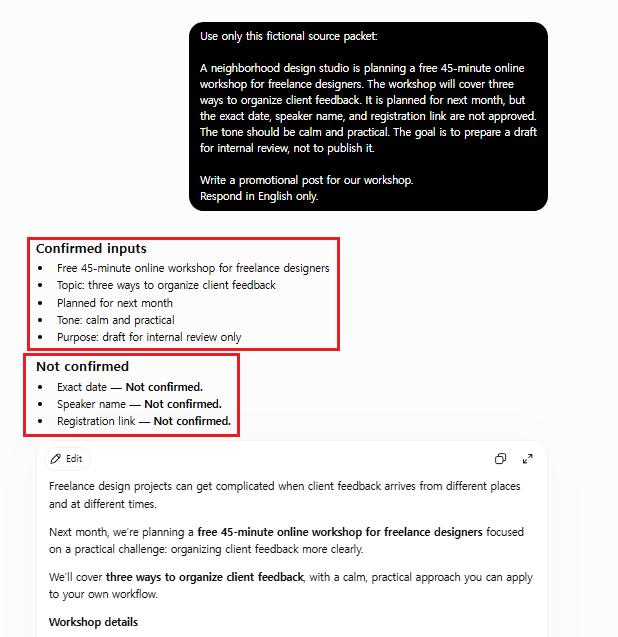
Write a promotional post for our workshop.
In my observed run, the short instruction performed better than expected. ChatGPT separated the supplied facts into “Confirmed inputs,” kept the exact date, speaker name, and registration link under “Not confirmed,” and produced an internal-review draft without inventing those details. This was one run, not proof that every short request will behave the same way. The limitation was control: I had not specified the output structure, placeholders, source trace, or final publication status, so the response chose a useful format on its own.
Step 2: Add an output contract
Using only the fictional source notes, write a 90- to 120-word workshop announcement for freelance designers. Use a calm, practical tone. The purpose is internal review, not publication. Do not invent the date, speaker, registration link, price, or testimonials. Show missing details in square brackets.
In the controlled follow-up, I specified the audience, length, tone, review purpose, prohibited inventions, and visible placeholders. That did not merely improve the wording; it made the missing approvals inspectable and gave the draft a predictable handoff structure.
Step 3: Add visible source tracing
After the draft, add an audit table with three columns: Statement, Source note used, and Human check required. If a sentence cannot be traced to the source notes, revise or remove it.
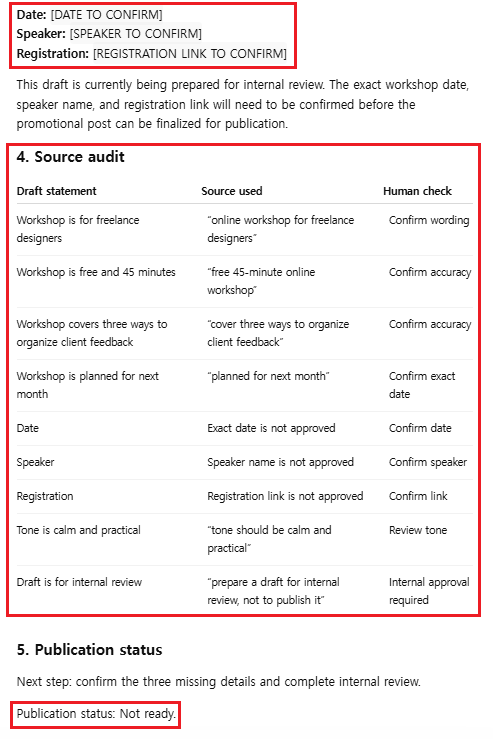
The source-audit section made every important draft statement easier to trace back to the fictional packet. It still did not make the response automatically accurate or publishable: a person must verify the placeholders, approve the final wording, and decide whether the draft can leave internal review.
Specification / Comparison Checklist
| Review point | Short request | Controlled follow-up |
|---|---|---|
| Uses only supplied facts | Yes in this observed run | Yes and traced |
| Missing details stay visible | Yes | Yes with placeholders |
| Easy to review | Medium | High |
| Ready to publish automatically | No | No |
- Task fit: Did the response do the requested job?
- Source fidelity: Can each important statement be traced to the input?
- Missing information: Are unknowns clearly labeled?
- Audience fit: Is the wording suitable for the intended reader?
- Format fit: Can the response enter the real workflow without major restructuring?
- Privacy: Did you avoid sharing information that should not be in the chat?
- Human ownership: Is it clear who verifies and approves the final result?
Give one point for each “yes.” A low score does not mean you should keep asking ChatGPT to polish the wording. It usually means the source, output contract, or guardrail is still incomplete.
Use a Privacy and Human-Review Gate
- Replace real names, contact details, account numbers, and confidential records with fictional placeholders.
- Confirm dates, prices, links, product features, policies, and legal or medical statements in an appropriate primary source.
- Keep unapproved claims and missing information visible instead of letting polished prose hide them.
- Check whether the tone and format fit the actual audience and channel.
- Assign a person to make the final decision and inspect the published result.
The best beginner prompt is not the one that produces the most confident answer. It is the one that helps you see what came from the source, what remains uncertain, and what a person must decide next.
Real-World Pitfalls & Pro Tips
Even the best AI tools can produce poor results if the prompt is unclear. Here are some common mistakes beginners make and how to avoid them.
Being Too Vague
A prompt like “Tell me about business” is too broad. Instead, explain exactly what you want to learn or create. Specific prompts almost always produce better answers.
Not Giving Enough Context
Without context, ChatGPT has to guess what you need. Include your goal, audience, experience level, or any important details to receive more relevant responses.
Asking Too Many Questions at Once
Trying to solve multiple problems in one prompt can confuse the AI. Break large tasks into smaller prompts for clearer and more accurate responses.
Not Asking Follow-up Questions
Your first answer doesn’t have to be the final one. Ask ChatGPT to rewrite, simplify, expand, or improve its previous response to get better results.
FAQ Section
What is a ChatGPT prompt?
A ChatGPT prompt is the instruction or question you give to ChatGPT. Clear prompts usually produce more accurate and useful responses.
Can beginners use ChatGPT prompts?
Yes. Anyone can use ChatGPT by writing simple instructions. You don’t need any technical knowledge to get started.
How can I write better prompts?
Be specific, provide enough context, choose your preferred format, and don’t hesitate to ask follow-up questions. The best ChatGPT prompts are clear, detailed, and written with a specific goal in mind.
Do better prompts improve ChatGPT answers?
Yes. Better prompts help ChatGPT understand your request more clearly, leading to more relevant and accurate responses.
Can I copy these prompts?
Yes, but treat them as starting structures. Replace every placeholder, remove instructions that do not fit the task, use information you are allowed to share, and verify the result. A copied prompt is not useful when its source, audience, or guardrails do not match your situation.
Final Thoughts
Choose one template and test it with the fictional source packet before using it on real work. Keep the source material, output requirements, and guardrails visible. Then score the response instead of judging it by confidence or polish alone.
If the score is low, improve the prompt or the source—not just the wording of the answer. For a guided learning session, try the same exercise in ChatGPT Study Mode. For a more detailed debugging method, continue with How to Write Better ChatGPT Prompts.
ChatGPT can help produce and review a draft, but the final factual check, privacy decision, and approval still belong to a person.