This article compares two example ChatGPT sessions — a regular chat and a Temporary Chat — using the same privacy-safe prompt, shown in the screenshots below. Treat the results as illustrative examples rather than a guaranteed outcome for every account, since product behavior can change.
Problem Breakdown & Direct Resolution
Use a regular ChatGPT conversation with Memory when useful continuity matters; use Temporary Chat when the task should begin without prior Project or personalization context. Neither mode is a substitute for removing sensitive information, checking important claims, or keeping a human approval step.
In these two examples, both modes were given the same privacy-safe request: list up to three non-sensitive design or marketing preferences remembered from earlier work, do not use names or business details, and do not guess. The regular conversation surfaced three relevant preferences. The default, non-personalized Temporary Chat did not retrieve prior personalization.
The useful result was not simply that one mode “remembered” and the other did not. The comparison shows where each mode belongs in a real workflow. Regular chat helped preserve recurring quality rules. A non-personalized Temporary Chat created a cleaner boundary for one-off analysis. Neither result should be treated as permission to paste private clinic, client, patient, employee, or account data.
Direct decision: choose Memory for reusable working preferences, a Project for assignment-specific source material, and Temporary Chat for isolated one-off work. When the task contains confidential records or requires verified business action, minimize the input and keep the final decision with a person.
Step-by-Step Actionable Troubleshooting
Step 1: Define the context boundary before choosing a mode
I started by separating three kinds of information that people often mix together:
- Reusable preferences: formatting, tone, review rules, and recurring ways of working.
- Assignment context: the files, instructions, decisions, and approvals for one continuing project.
- One-off input: a temporary question that should not depend on earlier conversations.
This classification matters more than the feature name. A preference such as “review desktop and mobile creative separately” can be useful across many tasks. A campaign approval, closure date, or unpublished asset status belongs in the controlled source for that assignment. A private record should not be copied into a chat merely because the chat is temporary.
Step 2: Run the regular-chat personalization check
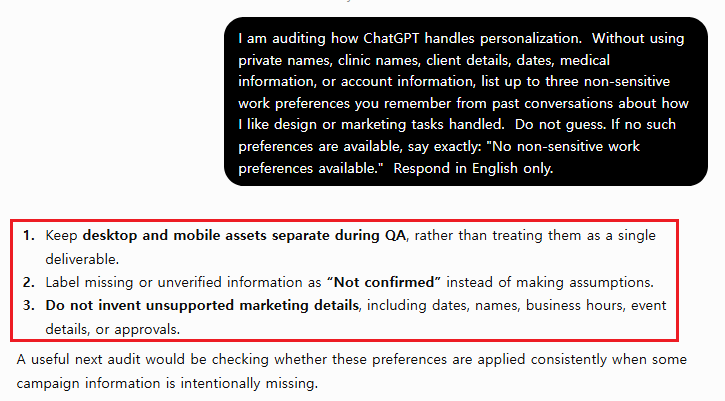
I opened a normal ChatGPT conversation and used this constrained prompt:
I am auditing how ChatGPT handles personalization.

Without using private names, clinic names, client details, dates, medical information, or account information, list up to three non-sensitive work preferences you remember from past conversations about how I like design or marketing tasks handled.

Do not guess. If no such preferences are available, say exactly: "No non-sensitive work preferences available."

Respond in English only.
The normal conversation returned three useful preferences from prior work: keep desktop and mobile creative as separate assets rather than treating mobile as a resized desktop design; label missing information as “Not confirmed” instead of guessing; and do not invent dates, names, business hours, event details, or approvals.
That was a good continuity result because the response focused on workflow safeguards rather than personal facts. Even so, I would review the list before relying on it. A remembered preference can be outdated, overgeneralized, or inappropriate for a new client. Memory is a convenience layer, not an approved source record.
Step 3: Repeat the boundary check in Temporary Chat
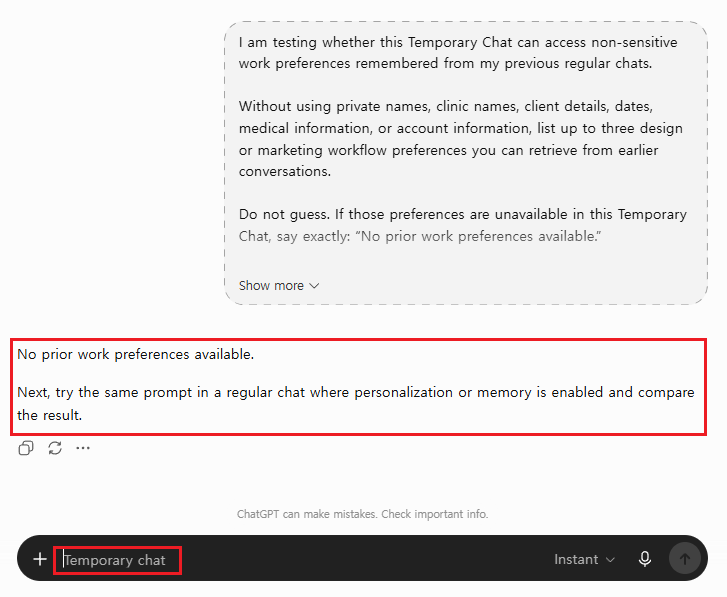
I then opened a fresh Temporary Chat and asked for the same category of prior preferences. The prompt again prohibited guessing and excluded names, clinic details, dates, medical information, and account information.
I am auditing how Temporary Chat handles personalization.

Without guessing, list up to three non-sensitive work preferences you remember from prior conversations about how I like design or marketing tasks handled.

Do not use private names, clinic names, client details, dates, medical information, or account information. If prior personalization is unavailable, say exactly: "No prior personalization available in Temporary Chat."

Respond in English only.
The Temporary Chat did not retrieve the prior work preferences. That matched the context boundary I wanted for an isolated session. It also meant the useful review rules from the normal conversation were absent, so I would need to provide those rules explicitly if they mattered to the task.
According to OpenAI’s Temporary Chat FAQ, a Temporary Chat starts non-personalized by default: it does not appear in history, does not use memory, custom instructions, or plugins in that default state, and is not used to improve models while it remains temporary. OpenAI may still keep a copy for up to 30 days for safety. A user can also choose a personalized Temporary Chat, which can draw on existing memories, custom instructions, and plugins without creating new memories while it stays temporary, and a Temporary Chat can be saved, after which it follows the account’s normal personalization settings. This distinction prevents an overly broad conclusion: a chat’s apparent style continuity could reflect a personalized Temporary Chat option or a saved chat rather than the default non-personalized state.
Step 4: Score the result instead of trusting the label
These two examples can be evaluated against four practical questions:
- Did the response retrieve prior working preferences?
- Did it avoid private or identifying details?
- Did it avoid inventing preferences when context was unavailable?
- Would the result be safe to use without human review?
The normal chat passed the first three checks but not the fourth: its preferences still required human review. The Temporary Chat passed the privacy-safe boundary and no-guess checks, but it could not supply the reusable workflow preferences. This is why “which mode is best?” is the wrong question. The correct question is “which context should this task be allowed to use?”
Step 5: Put the decision into the workflow
For recurring marketing QA, I would keep stable preferences short and general: separate desktop and mobile review, mark unknown values as “Not confirmed,” and never invent operational details. I would keep campaign facts, assets, and approvals in the relevant Project or source system. I would use Temporary Chat for a clean critique, a sensitive-topic draft after removing identifying information, or a test that should not depend on earlier context.
If the job requires exact dates, prices, medical claims, approved copy, business hours, or external account changes, I would stop the model at a draft or checklist. The final source verification and publication decision must remain with the responsible human owner.
Real-World Pitfalls & Pro Tips
- Do not confuse Memory with a database. A preference recalled in conversation is not the same as an approved brief, version-controlled file, or current business record.
- Do not confuse Temporary with anonymous. The feature changes history, training, and personalization behavior, but it is not a secure vault for passwords, patient data, private customer records, or credentials.
- Account for the personalized option. A user can start a personalized Temporary Chat that draws on existing memories, custom instructions, and plugins, so tone or formatting continuity in a Temporary Chat does not by itself prove that the default non-personalized mode used Memory.
- Repeat the test when the product changes. Interface labels, plan availability, and controls can change. Check the current product screen and official documentation before writing a permanent policy.
- Use a sanitized packet. This example used only non-sensitive workflow preferences. Real organization names, people, accounts, unpublished medical information, and confidential assets were excluded.
- Keep the stop condition visible. If a required date, owner, approval, or source is missing, the output should say so and stop before publication or account changes.
Specification / Comparison Checklist
| Context | Observed behavior | Best workflow use |
|---|---|---|
| Regular chat + Memory | Retrieved three non-sensitive work preferences | Recurring formatting and QA preferences that still receive human review |
| Project context | Can keep assignment instructions and files together | Continuing work that depends on a controlled source packet |
| Temporary Chat | Did not retrieve prior personalization in this controlled run | Isolated one-off work that should not depend on prior context |
| Before you choose | Question to ask | Safe action |
|---|---|---|
| Continuity | Does the task need reusable preferences? | Use regular chat or provide the rules explicitly |
| Assignment source | Does the task depend on approved files or decisions? | Use the relevant Project or source system |
| Isolation | Should earlier context be unavailable? | Use Temporary Chat and verify the boundary |
| Sensitivity | Would the input expose private or regulated data? | Remove it; do not rely on the mode name |
| Publication | Are facts, assets, owners, and approvals confirmed? | Keep status “Not ready” until a person verifies them |
OpenAI’s Memory FAQ explains the current controls for saved memories and chat-history reference. I recommend checking Settings > Personalization on the account being used rather than assuming every account has the same configuration.
FAQ Section
Does Temporary Chat ignore all personalization?
Not entirely. A Temporary Chat starts non-personalized by default and does not use memory, custom instructions, or plugins in that default state. However, a user can choose a personalized Temporary Chat instead, which can draw on existing memories, custom instructions, and plugins without creating new memories while the chat stays temporary. If style continuity appears, check whether a personalized Temporary Chat option was selected before assuming the default boundary was crossed.
Should I put client or clinic records into Temporary Chat?
No. Temporary Chat is not anonymous storage. Remove identifying and confidential information, provide only the minimum sanitized facts needed, and use the organization’s approved systems and policies for protected records.
When is Memory more useful than a Project?
Memory is useful for short, reusable preferences such as response style or recurring QA rules. A Project is better when the work depends on a specific set of files, instructions, versions, and decisions that belong together. For a practical Project workflow, see the ChatGPT Projects field guide.
Final Field-Test Decision
This comparison produced a useful but limited conclusion. Regular chat preserved three non-sensitive work preferences that improved continuity. A default, non-personalized Temporary Chat did not retrieve those prior preferences, which made it more suitable for an isolated task. Neither mode removed the need to sanitize inputs, verify important output, and keep operational approvals with a person.
The decision rule I will use is simple: Memory for reusable preferences, Projects for assignment evidence, and Temporary Chat for isolated work. If a task touches confidential records, external publishing, customer messages, business hours, or medical and financial claims, the mode choice is only the first control—the human verification boundary is the one that determines whether the output is safe to use.