You type /canvas expecting the familiar side-panel editor, and ChatGPT answers that the command did not open Canvas and suggests an inline writing block instead. That is what happened in my session on August 24, 2026, and rather than fight it, I tested whether ChatGPT inline writing could handle a controlled marketing edit without inventing missing details. The short version: the first draft was too long and used a table that did not suit a phone screen, and one measurable revision instruction fixed both.
The message fits what OpenAI’s model release notes describe: GPT-5.5 Instant and GPT-5.5 Thinking handle writing and code in in-chat blocks instead of Canvas. Coverage of that change at launch also reported that paid plans could still reach Canvas through older models for a transition period. Which editor you see depends on the model and plan selected, so treat the screenshot below as one session’s result rather than a statement about every account. The brief in the test was fictional; no real clinic, customer, or account data was used.
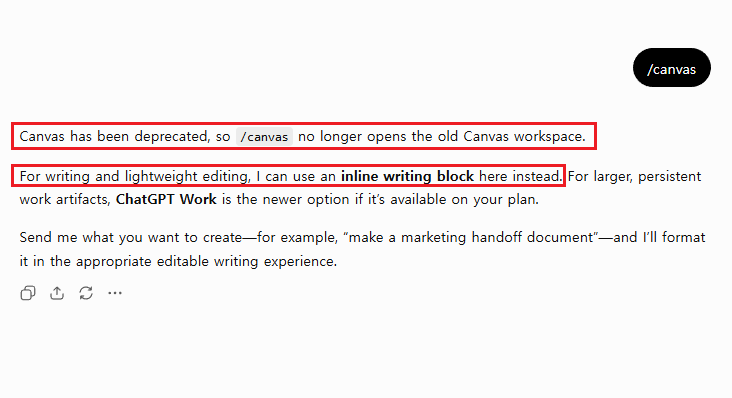
What the /canvas message actually said
The screenshot below is the exact response, captured with the command visible so the context is clear.
This connects to a broader principle of separating confirmed facts from missing information when prompting for marketing handoffs.
The practical resolution was simple: I stopped trying to force the old command to open and tested the editing experience ChatGPT actually offered. I used a sanitized fictional clinic-marketing brief, separated confirmed facts from unresolved inputs, generated an initial draft, and then applied a second instruction to reduce that draft to a mobile-friendly internal handoff.
Field note: The response you get from /canvas depends on the model selected in the picker, not only on your account. On a paid plan where an older model is still offered, switching to it may bring the Canvas panel back for a while. Whenever you screenshot a missing feature, keep the model name in the frame, or the screenshot will mislead readers a week later.
How I tested the inline writing block
Step 1: Record the exact behavior before changing anything
I first entered /canvas in a new ChatGPT conversation. The response stated that the command no longer opened the old Canvas workspace in that session and suggested inline writing for lightweight editing. I captured the message with the command visible and marked the two relevant sentences.
This evidence matters because a broad claim that Canvas is unavailable everywhere would be inaccurate. The accurate statement is narrower: the old command did not open Canvas in one account and model session I tested on August 24, 2026. A different plan, model, workspace, or later product update may behave differently.
Step 2: Build one controlled source packet
I used fictional clinic-marketing information so that the test would resemble a real handoff without exposing a clinic name, customer record, employee detail, account credential, or unpublished business information. The confirmed packet contained the format, audience, desktop and mobile sizes, approved headline, approved CTA, brand direction, desktop review status, and final publication owner.
For readers looking at keeping a controlled source packet across sessions, a related field test covers this in more depth.
I deliberately left five operational inputs unresolved: the exact closure date, reduced or special hours, approved mobile crop, customer-message send date, and final publication authorization. Each missing item had to remain labeled Not confirmed. This made it possible to see whether the writing tool would preserve uncertainty or silently fill the gaps.
Step 3: Review the first draft instead of trusting its polish
The first inline result preserved the confirmed and unconfirmed sections, but it was much longer than the internal handoff required. It also created a four-column approval table. The content was organized, yet the table was not a good fit for a narrow mobile screen, and the overall draft demanded more scrolling than the task justified.
This is a common workflow mistake: a well-structured response can still be inefficient. I did not score the result by how professional it sounded. I checked whether it was concise, mobile-safe, source-bounded, easy to scan, and explicit about the final human decision.
Step 4: Apply a measurable revision instruction
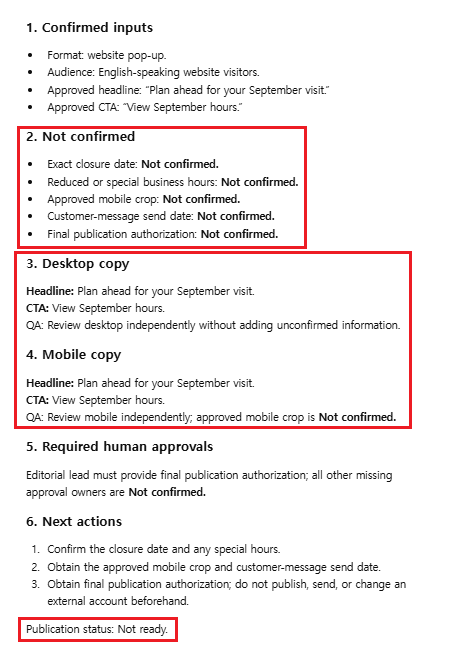
For the second pass, I instructed ChatGPT to revise the existing writing block rather than create another document. I limited the complete draft to 180 words, prohibited tables, required exactly six headings, preserved all five missing items, and restricted the desktop and mobile copy sections to the approved headline, approved CTA, and one QA sentence each.
The key change was not asking it to “make the draft shorter.” I defined what shorter meant and what information could not disappear. I also required exactly three next actions and the final line Publication status: Not ready. Those constraints made the success condition auditable.
Field note: Writing blocks are edited in place, so the wording of a revision request matters. Asking ChatGPT to revise the existing block keeps one current version in the thread; asking it to “write a shorter version” can leave you with a second block and two drafts to reconcile before the handoff.
Step 5: Compare the result against release blockers
The revised result was substantially more useful. It kept the five unresolved inputs visible, preserved separate desktop and mobile sections, removed the wide table, and ended with a clear publication stop. It also fit into a single readable vertical screenshot.
I would still not publish the generated pop-up copy directly. The test did not supply the closure date, special hours, approved mobile asset, customer-message date, or publication authorization. The inline writing block improved the handoff document; it did not complete the business approvals behind that document.
What to watch for in inline writing blocks
The first lesson is about scope. One interface result is one result, so I describe it as what happened in my tested session rather than as a feature every user has lost. The second is that structure is not accuracy: headings and tables make a draft look finished, and that polish can make unsupported details look more credible than they are. Asking for something “concise” without numbers is not enough either. A word limit, the sections that must stay, the formats that are not allowed, and the facts that must remain visible are what turn a vague request into one you can check.
Mobile deserves its own review rather than being treated as a resized desktop layout, and the approved mobile crop should be a required input, not an assumption. Missing dates, assets, links, owners, and approvals should stay visibly unresolved instead of being smoothed over to make the handoff look complete. Screenshots of the work should use fictional or sanitized material with account details, bookmarks, and sidebars cropped out. And an editable draft is still only a draft: a person has to verify facts, visual assets, customer-facing language, and who has the authority to publish.
First draft vs. controlled revision
| Audit point | First result | Controlled revision |
|---|---|---|
| Length control | Overlong for the task | Maximum 180 words |
| Mobile layout | Four-column table | No table |
| Missing inputs | Visible | All five preserved |
| Desktop and mobile | Separate sections | Separate concise sections |
| Human approval | Present but lengthy | One concise sentence |
| Final stop | Not ready | Not ready retained |
Field note: A table that reads well on a laptop can force sideways scrolling on a phone, which is how the four-column approval table in the first draft fell short. Before sending any handoff produced in a writing block, open it on the narrowest screen your reviewer is likely to use. If a table still overflows, rewriting it as short paragraphs works better than shrinking the font.
What the test proved, and what it did not
This controlled exercise showed that the available inline writing experience could reduce an oversized draft while preserving explicit source boundaries. It did not show that every model or account has the same interface, that the former Canvas workspace is unavailable everywhere, or that generated marketing copy is safe to publish without review.
The useful finding was operational: when the first response was too long, a measurable revision specification produced a better handoff. The second result was easier to scan, avoided a mobile-hostile table, maintained distinct desktop and mobile QA, and kept the publication decision with the Editorial lead.
Final Takeaway
When /canvas did not open the former workspace, I did not try to hide or work around the result. I documented the message, tested the replacement editing experience, measured the weak first draft, and applied a controlled revision.
The strongest improvement came from defining the edit boundary: maximum length, exact sections, no table, preserved missing inputs, separate desktop and mobile review, and a human publication stop. That is the part of this workflow I would reuse in real marketing QA.