Note: This article documents one account and model session where /canvas did not open Canvas (August 24, 2026), alongside a controlled writing exercise using a fictional clinic-marketing brief. No real clinic, customer, or account data was used. Update: current official Canvas guidance confirms Canvas remains available in supported models and interfaces; the May 28, 2026 model release note states GPT-5.5 Instant and GPT-5.5 Thinking use writing and code blocks instead of Canvas. This scoped observation should not be read as a general deprecation.
Problem Breakdown & Direct Resolution
In one account and model session, entering /canvas did not open the former Canvas workspace. ChatGPT instead displayed a message that the command did not open Canvas in that session and recommended an inline writing block, so I tested whether that replacement could still handle a controlled marketing edit without inventing missing information.
This connects to a broader principle of separating confirmed facts from missing information when prompting for marketing handoffs.
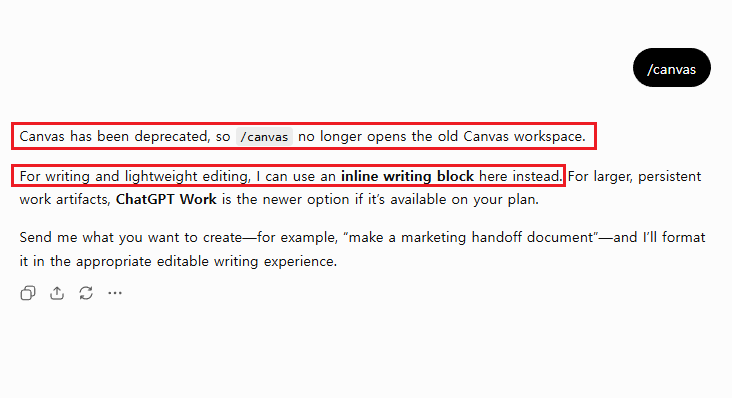
This is an account-specific field-test result, not a claim that every ChatGPT user sees the same interface. Product access can vary by model, plan, workspace, and rollout, so I recorded the exact screen rather than treating my observation as a universal product announcement.
The practical resolution was simple: I stopped trying to force the old command to open and tested the editing experience ChatGPT actually offered. I used a sanitized fictional clinic-marketing brief, separated confirmed facts from unresolved inputs, generated an initial draft, and then applied a second instruction to reduce that draft to a mobile-friendly internal handoff.
Direct answer: If
/canvasdoes not open the former workspace in your session, preserve a screenshot of the message, use the available inline writing experience, and test it with explicit source boundaries, length limits, and a human approval stop.
Step-by-Step Actionable Troubleshooting
Step 1: Record the exact behavior before changing anything
I first entered /canvas in a new ChatGPT conversation. The response stated that the command no longer opened the old Canvas workspace in that session and suggested inline writing for lightweight editing. I captured the message with the command visible and marked the two relevant sentences.
This evidence matters because a broad claim that Canvas is unavailable everywhere would be inaccurate. The accurate statement is narrower: the old command did not open Canvas in one account and model session I tested on August 24, 2026. A different plan, model, workspace, or later product update may behave differently, and current official guidance confirms Canvas remains available in supported models and interfaces, while GPT-5.5 Instant and GPT-5.5 Thinking use writing and code blocks instead.
Step 2: Build one controlled source packet
I used fictional clinic-marketing information so that the test would resemble a real handoff without exposing a clinic name, customer record, employee detail, account credential, or unpublished business information. The confirmed packet contained the format, audience, desktop and mobile sizes, approved headline, approved CTA, brand direction, desktop review status, and final publication owner.
For readers looking at keeping a controlled source packet across sessions, a related field test covers this in more depth.
I deliberately left five operational inputs unresolved: the exact closure date, reduced or special hours, approved mobile crop, customer-message send date, and final publication authorization. Each missing item had to remain labeled Not confirmed. This made it possible to see whether the writing tool would preserve uncertainty or silently fill the gaps.
Step 3: Review the first draft instead of trusting its polish
The first inline result preserved the confirmed and unconfirmed sections, but it was much longer than the internal handoff required. It also created a four-column approval table. The content was organized, yet the table was not a good fit for a narrow mobile screen, and the overall draft demanded more scrolling than the task justified.
This is a common workflow mistake: a well-structured response can still be inefficient. I did not score the result by how professional it sounded. I checked whether it was concise, mobile-safe, source-bounded, easy to scan, and explicit about the final human decision.
Step 4: Apply a measurable revision instruction
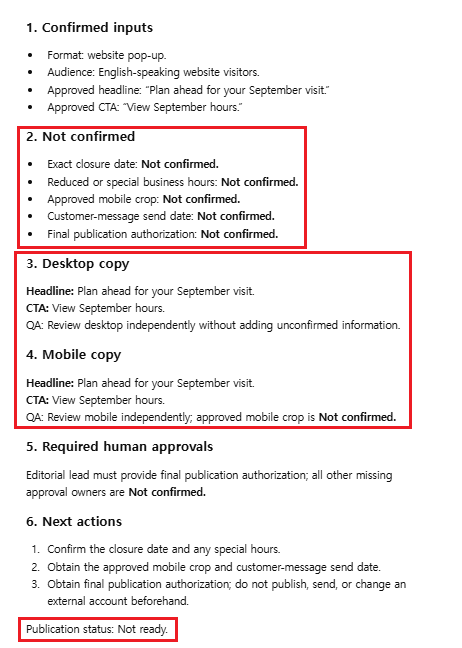
For the second pass, I instructed ChatGPT to revise the existing writing block rather than create another document. I limited the complete draft to 180 words, prohibited tables, required exactly six headings, preserved all five missing items, and restricted the desktop and mobile copy sections to the approved headline, approved CTA, and one QA sentence each.
The key change was not asking it to “make the draft shorter.” I defined what shorter meant and what information could not disappear. I also required exactly three next actions and the final line Publication status: Not ready. Those constraints made the success condition auditable.
Step 5: Compare the result against release blockers
The revised result was substantially more useful. It kept the five unresolved inputs visible, preserved separate desktop and mobile sections, removed the wide table, and ended with a clear publication stop. It also fit into a single readable vertical screenshot.
I would still not publish the generated pop-up copy directly. The test did not supply the closure date, special hours, approved mobile asset, customer-message date, or publication authorization. The inline writing block improved the handoff document; it did not complete the business approvals behind that document.
Real-World Pitfalls & Pro Tips
- Do not generalize one interface result. Write “in my tested session” rather than claiming every user has lost access to the same feature.
- Do not confuse structure with accuracy. Headings and tables can make unsupported information look more credible than it is.
- Do not use “make it concise” alone. Specify a word limit, retained sections, prohibited formats, and facts that must remain visible.
- Do not let mobile become a resized desktop afterthought. Review the two compositions separately and require an approved mobile crop.
- Do not hide unresolved inputs to make the result look finished. Missing dates, assets, links, owners, and approvals should remain visibly unresolved.
- Do not screenshot private work material. Use fictional or sanitized inputs and crop account details, browser bookmarks, sidebars, and unrelated conversations.
- Do not mistake an editable draft for an approved deliverable. A person still needs to verify facts, visual assets, customer-facing language, and publication authority.
Specification / Comparison Checklist
| Audit point | First result | Controlled revision |
|---|---|---|
| Length control | Overlong for the task | Maximum 180 words |
| Mobile layout | Four-column table | No table |
| Missing inputs | Visible | All five preserved |
| Desktop and mobile | Separate sections | Separate concise sections |
| Human approval | Present but lengthy | One concise sentence |
| Final stop | Not ready | Not ready retained |
On mobile, this three-column table should wrap inside the content width without creating a fourth approval column. If the active WordPress theme still produces horizontal overflow, I would replace it with six short comparison paragraphs rather than reduce the font to an unreadable size.
What This Field Test Actually Proved
This controlled exercise showed that the available inline writing experience could reduce an oversized draft while preserving explicit source boundaries. It did not show that every model or account has the same interface, that the former Canvas workspace is unavailable everywhere, or that generated marketing copy is safe to publish without review.
The useful finding was operational: when the first response was too long, a measurable revision specification produced a better handoff. The second result was easier to scan, avoided a mobile-hostile table, maintained distinct desktop and mobile QA, and kept the publication decision with the Editorial lead.
The current official ChatGPT product page describes Work mode as an option for creating and refining documents and other deliverables. I did not test Work mode in this experiment, so I have not treated the interface suggestion as evidence of its availability, behavior, or plan requirements in every account.
FAQ
Does this test mean ChatGPT Canvas has been removed for every user?
No. It only documents what happened in one account and model session I tested on August 24, 2026. Current official guidance confirms Canvas remains available in supported models and interfaces, while GPT-5.5 Instant and GPT-5.5 Thinking use writing and code blocks instead of Canvas, so check your own account and current official documentation for the latest behavior.
Why not publish the first result if it contained the correct sections?
The first result was longer than necessary and used a four-column table that was not ideal for mobile reading. Correct headings did not make it an efficient or publication-ready handoff.
Can an inline writing block approve missing marketing details?
No. It can organize a draft and preserve placeholders, but a responsible owner must confirm dates, hours, assets, links, customer-message timing, and final publication authorization.
Final Takeaway
When /canvas did not open the former workspace, I did not try to hide or work around the result. I documented the message, tested the replacement editing experience, measured the weak first draft, and applied a controlled revision.
The strongest improvement came from defining the edit boundary: maximum length, exact sections, no table, preserved missing inputs, separate desktop and mobile review, and a human publication stop. That is the part of this workflow I would reuse in real marketing QA.