Tag: AI Tools

  • How to Use ChatGPT for Work: 10 Practical Examples

    How to Use ChatGPT for Work: 10 Practical Examples

    Many professionals are looking for ways to save time, improve productivity, and work more efficiently with AI.

    ChatGPT is an AI assistant developed by OpenAI that helps users write, research, organize information, and complete tasks more efficiently.

    How to Use ChatGPT for Work is becoming an important skill as more people use AI tools for writing, research, planning, and everyday business tasks.

    ChatGPT is not designed to replace human creativity or decision-making. Instead, it can help you complete repetitive tasks faster, organize your thoughts, and create better results.

    In this guide, you’ll learn 10 practical ways to use ChatGPT at work, including writing emails, summarizing information, creating content, planning projects, and improving productivity.

    How to Use ChatGPT for Work

    How to Use ChatGPT for Work

    ChatGPT can assist with many different workplace tasks.

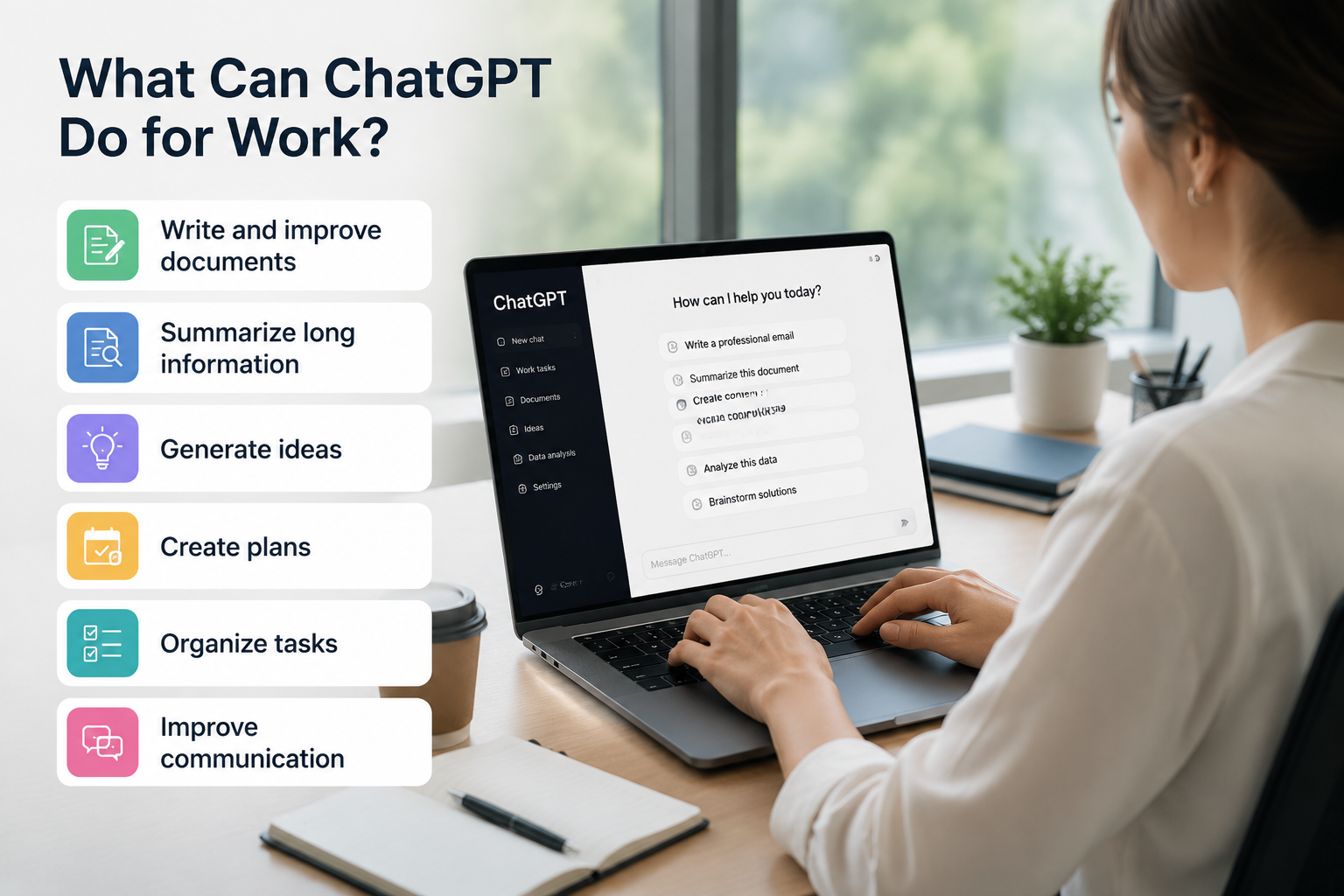
    Whether you are an employee, business owner, freelancer, or creator, ChatGPT can help you:

    • Write and improve documents
    • Summarize long information
    • Generate ideas
    • Create plans
    • Organize tasks
    • Improve communication

    If you are new to ChatGPT, start with our beginner guide: How to Use ChatGPT for Beginners.

    ChatGPT work use cases

    1. Writing Professional Emails

    Writing emails can take a lot of time, especially when you need the right tone and structure.

    ChatGPT can help you create professional emails, rewrite unclear messages, and adjust the tone depending on the situation.

    Example Prompt

    Write a professional email to a client explaining a project delay.
    Keep the tone polite and solution-focused.

    You can also ask ChatGPT to make an email shorter, friendlier, or more formal.

    2. Summarizing Long Documents

    Professionals often need to read reports, meeting notes, and research documents.

    ChatGPT can quickly summarize long content and highlight important information.

    Example Prompt

    Summarize this document into five key points.

    This can help you understand large amounts of information faster.

    3. Creating Content Ideas

    Content creation requires constant brainstorming.

    ChatGPT can help generate ideas for:

    • Blog posts
    • Social media content
    • Marketing campaigns
    • Video topics

    Example Prompt

    Create 10 content ideas for a small business.

    You can provide your industry, audience, and goals to get more relevant ideas.

    4. Creating To-Do Lists and Work Plans

    Managing multiple tasks can become difficult.

    ChatGPT can help organize your tasks into clear schedules and action plans.

    Example Prompt

    Create a weekly work schedule based on these tasks.

    You can also ask ChatGPT to prioritize tasks based on urgency and importance.

    5. Improving Writing Quality

    ChatGPT can help improve existing writing by making it clearer and more professional.

    It can help with:

    • Emails
    • Reports
    • Presentations
    • Articles
    • Business documents

    Example Prompt

    Rewrite this paragraph to sound more professional.

    Small improvements in wording can make your communication more effective.

    6. Research and Learning

    Learning new topics is an important part of many jobs.

    ChatGPT can explain complex topics in simple language and provide examples.

    Example Prompt

    Explain this topic like I'm a beginner.

    You can also ask ChatGPT to compare concepts, create summaries, or explain ideas step by step.

    7. Preparing Meetings

    Preparing for meetings often requires creating agendas, questions, and summaries.

    ChatGPT can help organize meetings more efficiently.

    Example Prompt

    Create a meeting agenda for a marketing team.

    You can also use ChatGPT to summarize previous meeting notes and create follow-up tasks.

    8. Creating Presentations

    Creating a presentation from scratch can take hours.

    ChatGPT can help you create:

    • Presentation outlines
    • Slide structures
    • Key talking points
    • Speaker notes

    Example Prompt

    Create a presentation outline about digital marketing.

    You can then customize the content based on your audience.

    9. Analyzing Data

    ChatGPT can help you understand data and find patterns.

    It can assist with:

    • Explaining data trends
    • Summarizing reports
    • Organizing information

    Example Prompt

    Analyze this data and explain the main insights.

    However, always verify important business decisions with accurate data sources.

    10. Brainstorming Solutions

    When facing a problem, generating multiple ideas can help you find better solutions.

    ChatGPT can act as a brainstorming partner by suggesting different approaches.

    Example Prompt

    Give me five possible solutions to this business problem.

    You can continue the conversation by asking ChatGPT to compare the advantages and disadvantages of each idea.

    A Practical Workflow: Turn Meeting Notes into Action Items

    A useful workplace test is to give ChatGPT a small set of meeting notes and ask for an action list that a team can actually review. The goal is not to let AI make decisions; it is to reduce the time spent organizing information.

    Example Prompt

    I will paste meeting notes below. Turn them into a table with four columns: action item, owner, deadline, and open question. Do not invent missing owners or dates; write “Not specified” instead. After the table, list any decision that still needs confirmation. Keep the wording concise.
    
    [Paste meeting notes here]

    How to interpret the result: a useful response separates confirmed tasks from unresolved questions. If ChatGPT assigns a person or deadline that does not appear in the notes, the output needs correction. This check is more important than how polished the table looks.

    Before sharing the result, compare every owner, date, number, and commitment with the original notes. Remove confidential client data, passwords, private employee information, and other sensitive material before entering workplace content into an AI tool.

    If you repeat the same type of task, you can store general preferences such as tone and formatting with ChatGPT Custom Instructions. Keep project-specific or confidential details out of permanent instructions.

    Best Practices for Using ChatGPT at Work

    Using ChatGPT effectively depends on how you communicate your instructions.

    Give Clear Instructions

    The better your prompt, the better your results will be.

    Avoid vague requests and provide enough context about your goal.

    Learn more about writing better prompts in our guide: 10 Common ChatGPT Prompt Mistakes

    Provide Enough Context

    ChatGPT works better when it understands your situation.

    Include details such as:

    • Your audience
    • Your goal
    • Your preferred format
    • Important background information

    For more prompt examples, check out our guide: Best ChatGPT Prompts for Beginners

    Review Important Information

    ChatGPT is a powerful assistant, but it can occasionally provide incorrect information.

    Always verify important information, especially for:

    • Business decisions
    • Financial information
    • Legal topics
    • Medical topics

    Learn more about choosing the right AI tool: ChatGPT vs Google

    Frequently Asked Questions

    Can ChatGPT improve productivity at work?

    Yes. ChatGPT can help reduce repetitive tasks, organize information, create drafts, and support better decision-making.

    Is ChatGPT useful for small businesses?

    Yes. Small business owners can use ChatGPT for marketing ideas, customer communication, content creation, and planning.

    Can ChatGPT replace employees?

    No. ChatGPT is a tool that helps people work more efficiently. Human judgment, creativity, and decision-making are still essential.

    Is ChatGPT safe to use at work?

    ChatGPT can be useful at work, but you should avoid entering confidential company information, passwords, or sensitive data.

    Conclusion

    Learning How to Use ChatGPT for Work can help professionals across many industries improve productivity and save time.

    By using ChatGPT for emails, research, writing, planning, and brainstorming, you can save time and focus on more important tasks.

    If you handle recurring work, learn how to use ChatGPT Projects to keep related chats, files, and instructions together in one focused workspace.

    When you are ready to move beyond general ideas, use our 20 practical ChatGPT prompts for work and follow the meeting-notes workflow to review owners, deadlines, and unsupported assumptions before sharing the result.

    The key is not simply using AI, but learning how to communicate with it effectively.

    Start with simple tasks, experiment with different prompts, and gradually discover how ChatGPT can improve your daily workflow.

  • ChatGPT vs Google: What’s the Difference? (2026 Guide)

    ChatGPT vs Google: What’s the Difference? (2026 Guide)

    ChatGPT vs Google is a common question for beginners who want to understand which tool is better for finding information, learning, and getting work done. Both tools can help you find information, but they work in very different ways.

    Google is designed to help you search the web and find existing information from websites. ChatGPT is designed to understand your questions, generate responses, and help you complete tasks through conversation.

    Understanding the difference between ChatGPT and Google will help you choose the right tool for writing, learning, research, and everyday problem-solving.

    What Is ChatGPT?

    ChatGPT is an AI assistant developed by OpenAI that understands natural language and generates human-like responses.

    Instead of searching through multiple websites, you can ask ChatGPT questions, request explanations, create content, summarize information, brainstorm ideas, and solve problems through a conversation.

    ChatGPT is especially useful when you need help creating something, understanding a topic, or improving your work.

    If you’re new to ChatGPT, our beginner guide explains how to get started:

    How to Use ChatGPT for Beginners

    What Is Google Search?

    Google is a search engine that helps you find information available on the internet.

    When you search for something, Google analyzes billions of web pages and shows relevant results, including websites, articles, images, maps, videos, and official sources.

    Google is especially useful when you need:

    • The latest news
    • Current prices
    • Official documents
    • Local information
    • Specific websites

    ChatGPT vs Google: Key Differences

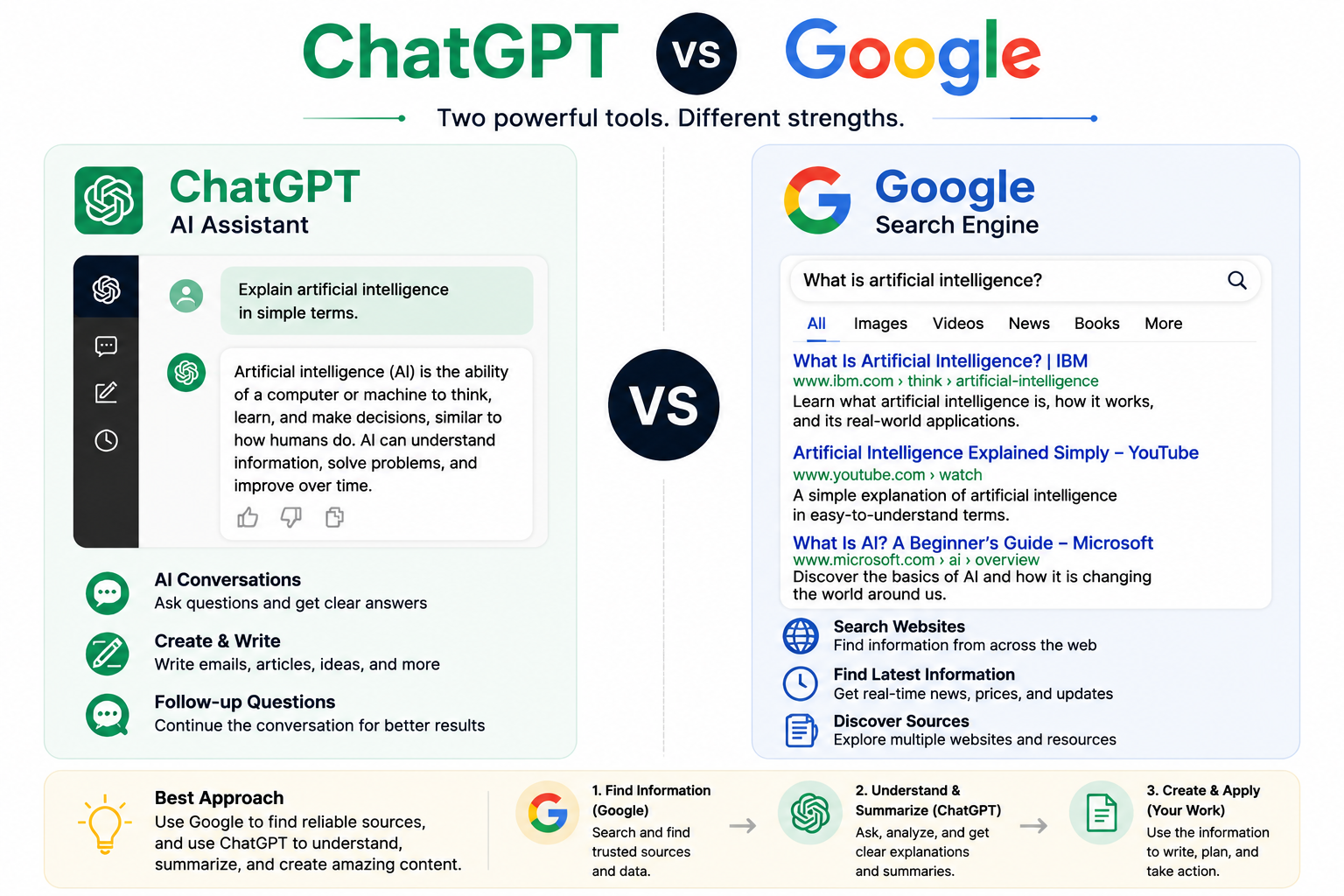
    The biggest difference between ChatGPT and Google is how they provide information.

    ChatGPT vs Google comparison
    FeatureChatGPTGoogle
    Main purposeConversation and AI assistanceFinding information online
    Best forWriting, explanations, brainstormingSearching websites and current information
    Response styleGenerated answersSearch results
    InteractionFollow-up conversationsNew searches
    Information sourceAI-generated responsesWebsites across the internet

    When Should You Use ChatGPT?

    ChatGPT is most useful when you need help creating, understanding, or organizing information.

    Writing Help

    ChatGPT can help you:

    • Write emails
    • Create blog posts
    • Rewrite sentences
    • Improve your writing style

    Example prompt:

    Write a professional email requesting a meeting next week.

    Small changes to your instructions can significantly improve the quality of the response.

    Learning and Explanations

    ChatGPT can explain difficult topics in simple language.

    Example prompt:

    Explain artificial intelligence to a 12-year-old using simple language.

    You can also ask ChatGPT to provide examples, create summaries, or explain concepts step by step.

    Brainstorming Ideas

    ChatGPT is useful for generating:

    • Business ideas
    • Content ideas
    • Marketing strategies
    • Project plans

    It can help you organize your thoughts and explore different possibilities quickly.

    When Should You Use Google?

    Google is better when you need information from the internet, especially information that changes frequently.

    Current Information

    Use Google for:

    • Today’s news
    • Stock prices
    • Weather
    • Events
    • Real-time updates

    Official Sources

    Google is useful when you need:

    • Government websites
    • Company announcements
    • Documentation
    • Research papers

    Local Information

    Google is often better for:

    • Restaurants
    • Stores
    • Directions
    • Nearby services

    A Practical Test: Use ChatGPT and Google for the Same Question

    The difference becomes clearer when both tools are used for one real task. Imagine that you are preparing for a flight and want to know the current rules for carrying lithium batteries.

    Step 1: Use ChatGPT to Understand the Topic

    Start by asking ChatGPT for an organized explanation and a list of details that still need verification:

    Explain the general rules for carrying lithium batteries on a passenger flight. Separate carry-on and checked-baggage guidance, list the details I need to confirm, and do not assume that every airline follows exactly the same policy.

    A useful response should separate battery types, identify details such as watt-hours and spare batteries, and remind you that airline and government rules may differ. This is valuable for orientation, but it is not the final authority. A confident answer can still be incomplete, outdated, or based on the wrong jurisdiction.

    Step 2: Use Google to Find the Primary Source

    Next, search for a current government or airline page rather than relying on a summary alone. A focused query could be:

    site:faa.gov lithium batteries passenger baggage

    Open the official result and check its publication or update date, the country it covers, battery limits, and any airline-specific exceptions. Google helps you locate the source, but you still need to judge whether the page is authoritative and relevant to your trip.

    Step 3: Compare the Answer with the Source

    • Does the ChatGPT summary match the official page?
    • Are any dates, limits, or exceptions missing?
    • Does the advice apply to your country and airline?
    • Can you explain the rule in your own words after checking it?

    This workflow shows the practical difference: ChatGPT is useful for explaining and organizing a question, while Google is useful for locating current primary sources. For legal, medical, financial, safety, or travel decisions, verify the important details on the original source before acting.

    OpenAI also advises users to treat ChatGPT as a starting point and verify important information from reliable sources. You can read its guidance in Does ChatGPT tell the truth?. Google explains how Search organizes information and aims to surface relevant, reliable results in How Search Works.

    If the research will continue over several days, save the verified sources and instructions in one workspace. Our ChatGPT Projects guide explains a practical way to keep related chats, files, and context together.

    Can ChatGPT Replace Google?

    When comparing ChatGPT vs Google, the short answer is:

    No, ChatGPT cannot completely replace Google.

    Using ChatGPT and Google together

    ChatGPT and Google are different tools designed for different purposes.

    ChatGPT is excellent for:

    • Understanding concepts
    • Creating content
    • Organizing ideas
    • Having conversations

    Google is excellent for:

    • Finding websites
    • Checking recent information
    • Discovering reliable sources

    The best approach is to use both tools together.

    For example:

    1. Use Google to find reliable sources.
    2. Use ChatGPT to summarize and explain the information.
    3. Use ChatGPT to organize your ideas or create content.

    How to Get Better Results from ChatGPT

    The quality of ChatGPT’s answers depends heavily on the quality of your prompts.

    Instead of asking:

    Tell me about marketing.

    Try:

    Explain digital marketing for a small coffee shop in simple terms with three practical examples.

    A clear goal, enough context, and a specific format usually lead to better results.

    For more examples, check out:

    Best ChatGPT Prompts for Beginners

    Common Mistakes When Comparing ChatGPT and Google

    Many beginners expect ChatGPT to work exactly like a search engine.

    However, ChatGPT and Google are designed for different purposes.

    Common mistakes include:

    • Asking ChatGPT for information that changes every minute
    • Not verifying important information
    • Using vague prompts
    • Expecting one perfect answer immediately

    Learn how to avoid common prompt mistakes:

    10 Common ChatGPT Prompt Mistakes

    Frequently Asked Questions

    Is ChatGPT better than Google?

    Neither tool is always better.

    ChatGPT is better for conversations, explanations, and creating content, while Google is better for finding current information and websites.

    Can ChatGPT search the internet?

    ChatGPT can access current information in some versions and situations, but it works differently from traditional search engines like Google.

    Should beginners use ChatGPT or Google?

    Beginners should learn to use both.

    Use Google when you need sources and current information, and use ChatGPT when you need explanations, ideas, or help creating something.

    Is ChatGPT free?

    ChatGPT offers a free version, while paid plans provide additional features and higher usage limits.

    Conclusion

    ChatGPT and Google are not competitors where one tool must replace the other.

    They are different tools designed for different purposes.

    Google helps you find information from the web, while ChatGPT helps you understand information and create new content through conversation.

    Once you understand when to use each tool, you can save time, learn faster, and become more productive.

    The best digital skill today is not choosing between ChatGPT and Google—it is knowing how to use both effectively.